VitXi outbound calls fail immediately

Hi, I’m setting up VitXi and outbound calls are failing right away. VitXi registers successfully and can receive inbound calls, and desk phones on the same system can make outbound calls fine. The issue only happens on outbound calls from VitXi, where I hear a dialtone and the call drops.

when the call fails im receiving error 603 Decline with Q.850 cause 88 / Incompatible destination when the outbound call fails.

1 Like

Hello,

Could you please share a screenshot of the default WebRTC device profile settings.,

Please ensure that any sensitive information is hidden.,

Best regards,

Things I’ve tried:

  • Made sure VitXi is actually registering and staying connected.
  • Confirmed inbound calls to VitXi work.
  • Confirmed outbound calls work from the physical phones.
  • Created a separate test extension just for VitXi so it wasn’t sharing with the desk phones.
  • Checked the contacts and confirmed the test extension only has one active WSS/WebRTC contact.
  • Checked the original extension and saw it had multiple contacts registered at once.
  • Turned the firewall off completely just to rule that out.
  • Pulled Asterisk/PJSIP logs during the failed calls instead of just looking at CDR.
  • Confirmed the PBX is the side sending back 603 Decline with cause 88 / incompatible destination.
  • Confirmed the call is actually matching the outbound route and getting sent to the trunk before it fails.
  • Compared the WebRTC extension settings against the trunk settings.
  • Checked RTP / ICE related settings.
  • Tried testing from both my normal extension and a clean test extension, and the issue still happens.
1 Like

Hello!

Could you please check if the extension associated with the vitxi user has the webrtc profile assigned?. Also, make sure the following codecs are added in the pjsip settings: opus, allaw, ullaw, vp8

Also, please update to the latest version of VitXi: 🚀 VitXi WebRTC v4.6.0-2: Faster, Smarter Communication Experience

Let me know if it worked for you,

Best regards,

The extension has the webrtc profile assigned, ive just added opus and vp8. Alaw and ulaw were already selected, and i’ve just updated to the latest version, the call still does the same thing.
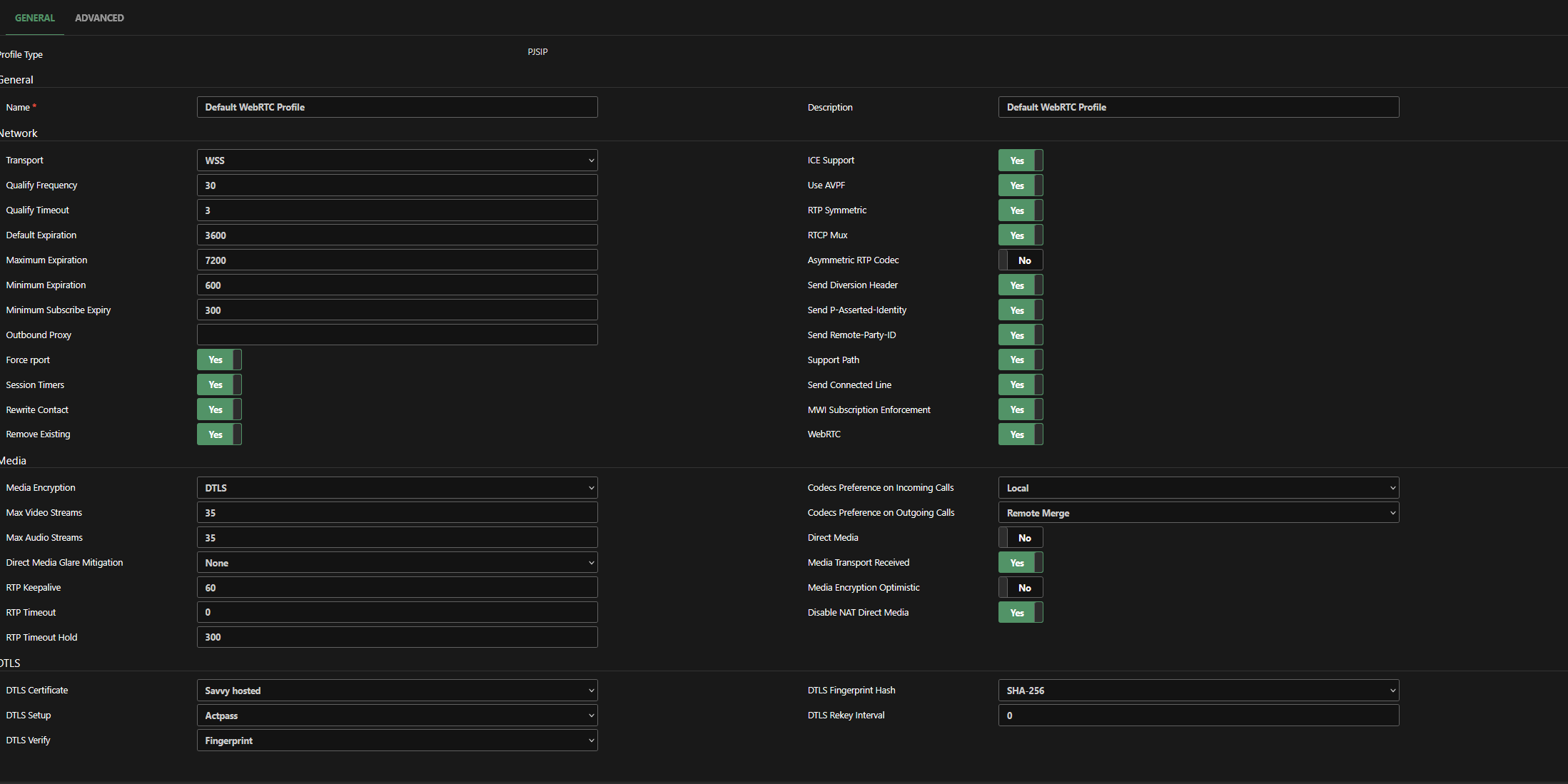
What codecs and device profile are configured in the PJSIP trunk? Also, make sure the Strict RTP option is disabled in the RTP Settings module.,

1 Like

because of this I finally figured it out, my profile in my trunk was still set to the default pjsip profile instead of the webrtc profile, thank you

1 Like