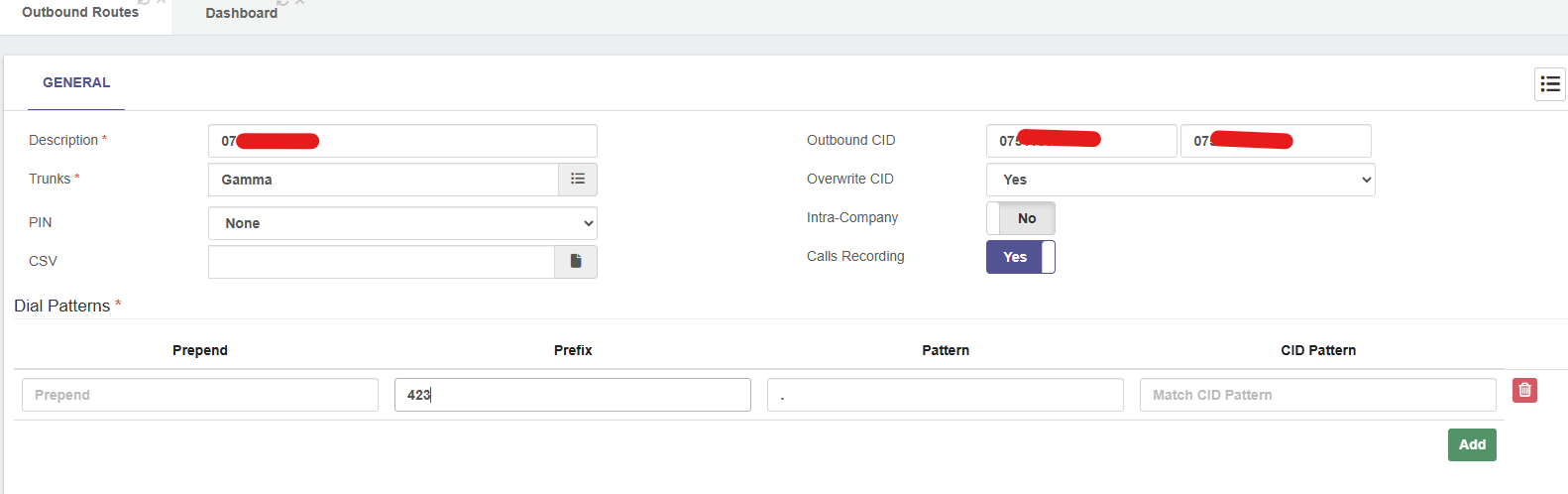
We have done this with our VitalPBX instance. How we achieved it was by using Outbound Routes to overwrite the CID, all you need to do is dial a prefix code before the telephone number you are calling, the prefix code is detected by the outbound route and changes the Outbound CID based upon the rule.
Description: give it a useful name
Outbound CID: enter the Name and Number you wish to display to the person you are calling
Trunks: Select the SIP Trunk you wish to use
Overwrite CID: Must be set to YES
Prefix: Use a suitable code (423 in my example)
Pattern: I used . for simplicity but feasibly you can use any pattern you require
Potentially you could use a button to dial the prefix for you, our you could just dial the prefix manually.
Its worth mentioning that you can have as many outbound routes with their own prefix as you need. if you dont dial a prefix, then your outbound call will display you main outbound CID.