I’m running VitalPBX 4.5 on a DigitalOcean droplet and deploying Snom desk phones. Everything connects over TLS on port 5061 using a Device Profile with SDES encryption.
I ran into an issue where inbound calls weren’t reaching the phones — the INVITE was being sent on a new TLS connection instead of reusing the one the phone established during registration. The fix was setting symmetric_transport=yes on the default TLS transport.
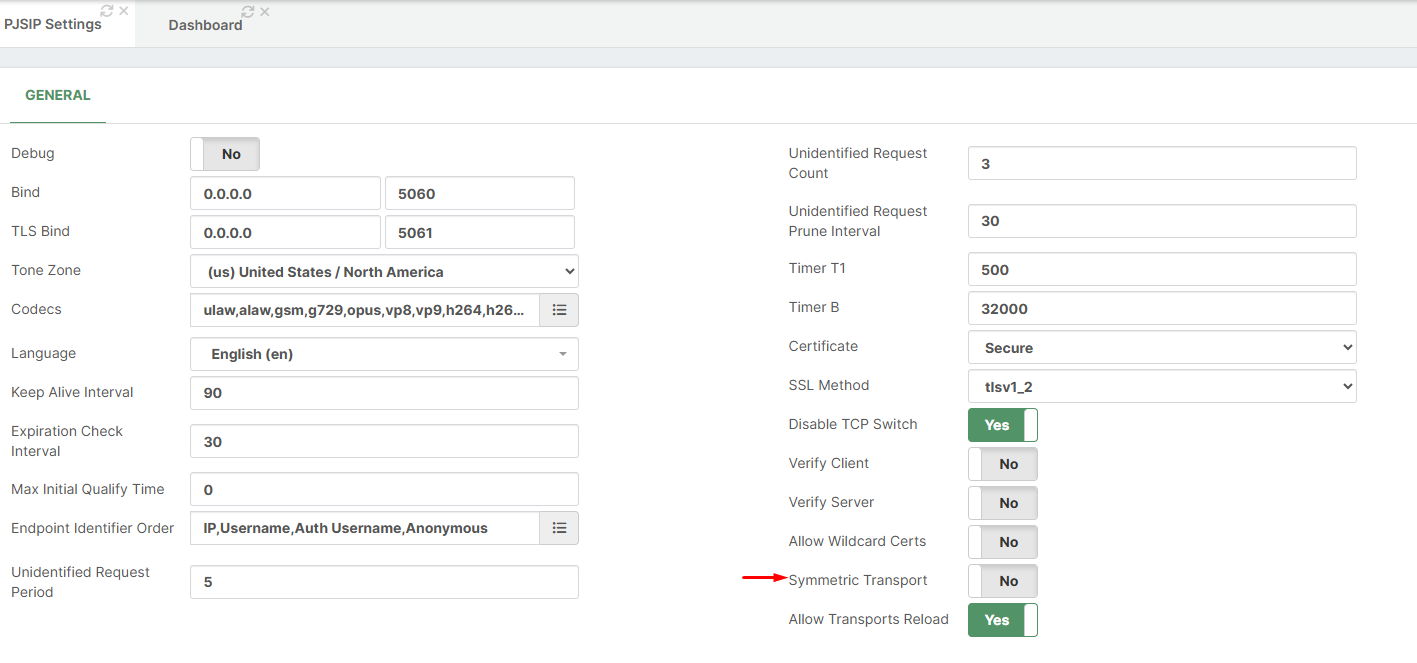
My concern is there’s no way to set this in the GUI. The PJSIP Settings page doesn’t expose symmetric_transport for the built-in transports, and the PJSIP Transports section only covers custom transports. I ended up creating a separate config file to override it, but every time I do an Apply Changes I need to run a core restart for it to take effect again.
Is there a way to configure symmetric_transport on the default TLS transport through the GUI that I’m missing? If not, would it be possible to add this option to the PJSIP Settings page? It’s pretty much required for any TLS deployment with phones behind NAT.
Thanks for the fix. I can confirm “symmetric_transport=yes” is now visible in the PJSIP Transport GUI. Much appreciated.
However, I’m still experiencing a persistent issue: every time I do an “Apply Changes”, incoming calls stop working until I run "asterisk -rx “core restart now”. This happens even for minor changes like adding a new Inbound Route.
My current setup:
Custom PJSIP Transport with “symmetric_transport=yes” and TLS selected in Device Profile
The generated pjsip__20-transport.conf shows three TLS transports all binding on 0.0.0.0:5061 simultaneously; the native TLS, the MS Teams TLS, and my custom TLS. I suspect this port conflict is causing the issue.
Question: Is there a supported way to have a single TLS transport with “symmetric_transport=yes” without the conflict? Should we be using the native TLS transport instead of a custom one, and if so, how do we apply “symmetric_transport=yes” to it without a custom transport?