We worked with the developer of avr-agent (Agent Voice Response · GitHub) to get this working with VitalPBX. Gcareri has been awesome to work with and is building a nice community around AVR.
We’ve added a custom dialplan to route extensions 5001-5009 to avr-agent and gcareri modified avr-agent so we can pass information to it to load a prompt.
First you’ll need to create an AMI user however I haven’t narrowed down permissions but assigning all permissions available in the VitalPBX GUI doesn’t seem to be enough. I created the user in the GUI then edited the file in /etc/asterisk/vitalpbx/manager__50-1-users.conf and set read=all and write=all. I don’t know if this file is only overwritten by VitalPBX when you edit the AMI users. Editing call flows and then reloading didn’t affect it. Make sure to lock this down to the IP address avr-agent connects from.
Next add a custom dialplan option. In
/etc/asterisk/vitalpbx/extensions__90-avr.conf add
[cos-all-custom](+)
exten => _500[1-9],1,Answer()
 same => n,Ringing()
 same => n,Set(AVR_TENANT_ID=T${IF($["${TENANT_ID}"=""]?1:${TENANT_ID})}_${CALL_DESTINATION})
 same => n,NoOp(AVR_TENANT_ID is ${AVR_TENANT_ID})
 same => n,Set(UUID=${SHELL(uuidgen | tr -d '\n')})
 same => n,Dial(AudioSocket/127.0.0.1:5001/${UUID})
 same => n,Hangup()
Here’s our docker-compose.yml
Edited to stick with avr-stst-openai version 1.3.4 - I’ll update as this changes 9/5/25
Edited to move to latest avr-sts-openai and add avr-instructions container 9/8/25
services:
  avr-core:
    image: agentvoiceresponse/avr-core
    platform: linux/x86_64
    container_name: avr-core
    restart: always
    environment:
      - PORT=5001
      - STS_URL=ws://avr-sts-openai:6030
    ports:
      - 5001:5001
    networks:
      - avr

  avr-sts-openai:
    image: agentvoiceresponse/avr-sts-openai
    platform: linux/x86_64
    container_name: avr-sts-openai
    restart: always
    environment:
      - PORT=6030
      - OPENAI_API_KEY=$OPENAI_API_KEY
      - OPENAI_MODEL=gpt-4o-realtime-preview
      - OPENAI_URL_INSTRUCTIONS=http://avr-instructions:3000/instructions
      - AMI_URL=${AMI_URL:-http://avr-ami:6006}
    # volumes: # uncomment if you want to use the custom tools
    #   - ./tools:/usr/src/app/tools
    networks:
      - avr

  avr-instructions:
    image: gcareri/avr-instructions
    platform: linux/x86_64
    container_name: avr-instructions
    restart: always
    environment:
      - PORT=3000
      - AMI_URL=${AMI_URL:-http://avr-ami:6006}
      - VITALPBX_URL=${VITALPBX_URL:-https://yourVitalPBX_URL/avr-agent.php?prompt=}
    networks:
      - avr

  avr-ami:
    image: agentvoiceresponse/avr-ami
    platform: linux/x86_64
    container_name: avr-ami
    restart: always
    environment:
      - PORT=6006
      - AMI_HOST=${AMI_HOST:-avr-asterisk}
      - AMI_PORT=${AMI_PORT:-5038}
      - AMI_USERNAME=${AMI_USERNAME:-avr}
      - AMI_PASSWORD=${AMI_PASSWORD:-avr}
    ports:
      - 6006:6006
    networks:
      - avr

networks:
  avr:
    name: avr
    driver: bridge
    ipam:
      config:
        - subnet: 172.20.0.0/24
And here’s the relevant .env entries for OpenAI Realtime
# Container Ports
CORE_PORT_START=5000
ASR_PORT_START=6000
LLM_PORT_START=7000
TTS_PORT_START=8000
AMI_PORT=9000

# Network
AVR_NETWORK=avr

# AMI
AMI_HOST=your_vitalpbx_ip
AMI_PORT=5038
AMI_USERNAME= your_ami_user
AMI_PASSWORD= your_ami_password

# OPENAI
OPENAI_API_KEY=your_openai_key
OPENAI_MODEL=gpt-4o-mini-realtime
OPENAI_MAX_TOKENS=100
OPENAI_TEMPERATURE=0.0
I added a small PHP file as a test to respond to avr-agent’s prompt lookup query in /usr/share/vitalpbx/www/avr-agent.php
<?php
// avr-agent.php

if (!isset($_GET['prompt'])) {
    http_response_code(400);
    echo "Missing prompt parameter.";
    exit;
}

$prompt = $_GET['prompt'];

if (preg_match('/^T(\d+)_(\d+)$/', $prompt, $matches)) {
    $tenant    = $matches[1];
    $extension = $matches[2];
    $response  = "You are answering phone calls in English, greet the caller and let them know you are at extension $extension for tenant $tenant.";
} else {
    $response = "Invalid prompt format. Expected format: T{tenant}_{extension}.";
}

// Output
header('Content-Type: text/plain; charset=utf-8');
echo $response;
And last in VitalPBX I added custom destinations for the new extensions
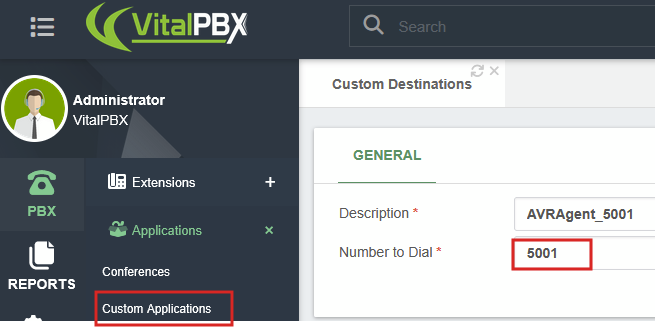
To test I created custom destinations for 5001, 5002, and 5003. Setup an IVR with 1 routed to 5001, 2 to 5002, and 3 to 5003.
Calling in to the system you should now be able to select an extension and the talk to OpenAI Realtime. Note with this basic prompt OpenAI was not responding until I said something.
What’s really awesome about this is AVR Agent supports a lot of different TTS, ASR, and LLM services. Gcareri just got it working with Gemini a couple days ago as well. He’ll be working on support for transferring and ending calls with OpenAI which I think is the only major piece missing now.