# WebRTC behind firewall (SQUID Reverse Proxy / Sophos UTM Help)
**URL:** https://forums.vitalpbx.org/t/webrtc-behind-firewall-squid-reverse-proxy-sophos-utm-help/1912
**Category:** VitXi WebRTC
**Created:** [October 24, 2022, 8:27pm UTC](https://forums.vitalpbx.org/t/webrtc-behind-firewall-squid-reverse-proxy-sophos-utm-help/1912 "2022-10-24T20:27:22Z")
**Posts on this page:** 20
**Page:** 1
### Author:  [@david.henry](https://forums.vitalpbx.org/u/david.henry)
#### Post date: [October 24, 2022, 8:27pm UTC](https://forums.vitalpbx.org/t/webrtc-behind-firewall-squid-reverse-proxy-sophos-utm-help/1912/1 "2022-10-24T20:27:22Z")
Hello,
I installed VitalPBX with VitXi (Starter license) on my LAN.
I have installed real SSL Certificat (wildcard).
All works on my LAN.
I would like acces Vitxi from outside.
I use Sophos UTM as gateway and firewall.
I setup reverse proxy on it (with SSL).
I setup NAT for port 8089.
I can access VitXI login page , I can log in … but after I get a RED pop up with message :
##### The connection to your server could not be established.
Please, contact the administrator.
So could you help me ?
Is it possible to use Reverse proxy to secure access to Vitxi ?
Which port should I forward to my vitalpbx/vitxi server ?
Thanks for your help.
Regards
---
### Author:  [@mo10](https://forums.vitalpbx.org/u/mo10)
#### Post date: [October 24, 2022, 9:11pm UTC](https://forums.vitalpbx.org/t/webrtc-behind-firewall-squid-reverse-proxy-sophos-utm-help/1912/2 "2022-10-24T21:11:55Z")
Hi,
did you really do ALL of this?
> **[VitalPBX Preparations - VitalPBX Wiki](https://wiki.vitalpbx.com/documentation/vitxi-webrtc/vitalpbx-preparations/)**
>
> For VitXi WebRTC to work perfectly, it is necessary to have a valid FQDN to assign it security certificates. Coming up, we will show you the steps to follow
And look into settings of Vitxi. I think you can enter Hostname there.
So you should use a dyndns in your case?
KR
---
### Author:  [@david.henry](https://forums.vitalpbx.org/u/david.henry)
#### Post date: [October 25, 2022, 6:26am UTC](https://forums.vitalpbx.org/t/webrtc-behind-firewall-squid-reverse-proxy-sophos-utm-help/1912/3 "2022-10-25T06:26:36Z")
Hello,
I did everything written on your Wiki guide.
All work perfectly on LAN.
I can access my Vitxi without any problem :
[https://vitxi.MYdomain.fr/webrtc/](https://vitxi.MYdomain.fr/webrtc/)
I can log in and use it. (receive call …)
I use split DNS to use DNS on my LAN and from OUTSIDE.
on my LAN:
[vitxi.MYDOMAIN.fr](http://vitxi.MYDOMAIN.fr) resolve LAN ADDRESS
Outside :
[vitxi.MYDOMAIN.fr](http://vitxi.MYDOMAIN.fr) resolve WAN ADDRESS
But I want to be able to use it outside my LAN , so I used Sophos UTM (which use SQUID as Reverse proxy) to access VitXi.
I added a NAT rule for 8089 port.
From outside , when I try to access VitXi , I use :
[https://vitxi.MYDOMAIN.fr/webrtc/](https://vitxi.MYDOMAIN.fr/webrtc/)
I can log in , but I get a red popup :
##### The connection to your server could not be established
and I’m not able to make a call or receive a call.
Regards
David
---
### Author:  [@david.henry](https://forums.vitalpbx.org/u/david.henry)
#### Post date: [October 25, 2022, 9:51am UTC](https://forums.vitalpbx.org/t/webrtc-behind-firewall-squid-reverse-proxy-sophos-utm-help/1912/4 "2022-10-25T09:51:59Z")
So I moved forward.
I allowed “websocket” on firewall , and now , I can send or receive call.
But … I have no sound.
On my laptop , it’s ringing … I answer … but I can’t hear something … no sound.
Same thing on other way.
Do you have any idea ?
Regards
---
### Author:  [@mohamed.soliman](https://forums.vitalpbx.org/u/mohamed.soliman)
#### Post date: [October 25, 2022, 1:08pm UTC](https://forums.vitalpbx.org/t/webrtc-behind-firewall-squid-reverse-proxy-sophos-utm-help/1912/5 "2022-10-25T13:08:52Z")
Go to RTP settings
In ICE settings
Put the local host the ip adress of the local network and in advertised adress put the public ip
Then Make DNAT rule on the firewall to forward port 443 and 8089
Make sure to disable the reflexive rule if you have internal routing
---
### Author:  [@david.henry](https://forums.vitalpbx.org/u/david.henry)
#### Post date: [October 25, 2022, 2:58pm UTC](https://forums.vitalpbx.org/t/webrtc-behind-firewall-squid-reverse-proxy-sophos-utm-help/1912/6 "2022-10-25T14:58:44Z")
Hi,
Thanks for your help.
I will try this evening.
Regards
---
### Author:  [@PitzKey](https://forums.vitalpbx.org/u/PitzKey)
#### Post date: [October 26, 2022, 5:24am UTC](https://forums.vitalpbx.org/t/webrtc-behind-firewall-squid-reverse-proxy-sophos-utm-help/1912/7 "2022-10-26T05:24:34Z")
Two things to note here.
1. Wildcard SSL certificate only recently got support in Asterisk, I’m not sure if VitalPBX is already running the version that supports it. (I can check later what version has support. The reason why it wasn’t in Asterisk, is because wildcard SSL certs in SIP are against the RFC rules. But hey, everyone is doing it anyway, so they decided to add it)
2. We are also using WebRTC behind a NGINX proxy and experience the same issue.
In the past, it was working fine, but around 6 months ago there was some update to VitXi and since then we started having issues. @maynor kept on saying that the new update requires the server hostname and the domain name to match, which is super annoying as we have multi tenancy with a unique domain for each tenant… As well as the hostname and domain matching isn’t a WebRTC standard requirement.
I also _think_ that because the browser SSL and Asterisk SSL are not the same, that’s probably what’s causing it. Meaning, Asterisk uses the SSL configured on the PBX and the WebRTC client uses your proxy’s SSL.
I think that if VitalPBX offers multi tenancy, they MUST support using different WebRTC domains as well as wildcard SSLs. Additionally, it would be nice if they test it behind a popular proxies such as NGINX, Caddy, HAProxy etc. Since proxies are today everywhere for security reasons.
---
### Author:  [@miguel](https://forums.vitalpbx.org/u/miguel)
#### Post date: [October 26, 2022, 5:38am UTC](https://forums.vitalpbx.org/t/webrtc-behind-firewall-squid-reverse-proxy-sophos-utm-help/1912/8 "2022-10-26T05:38:40Z")
> [@PitzKey](#):
>
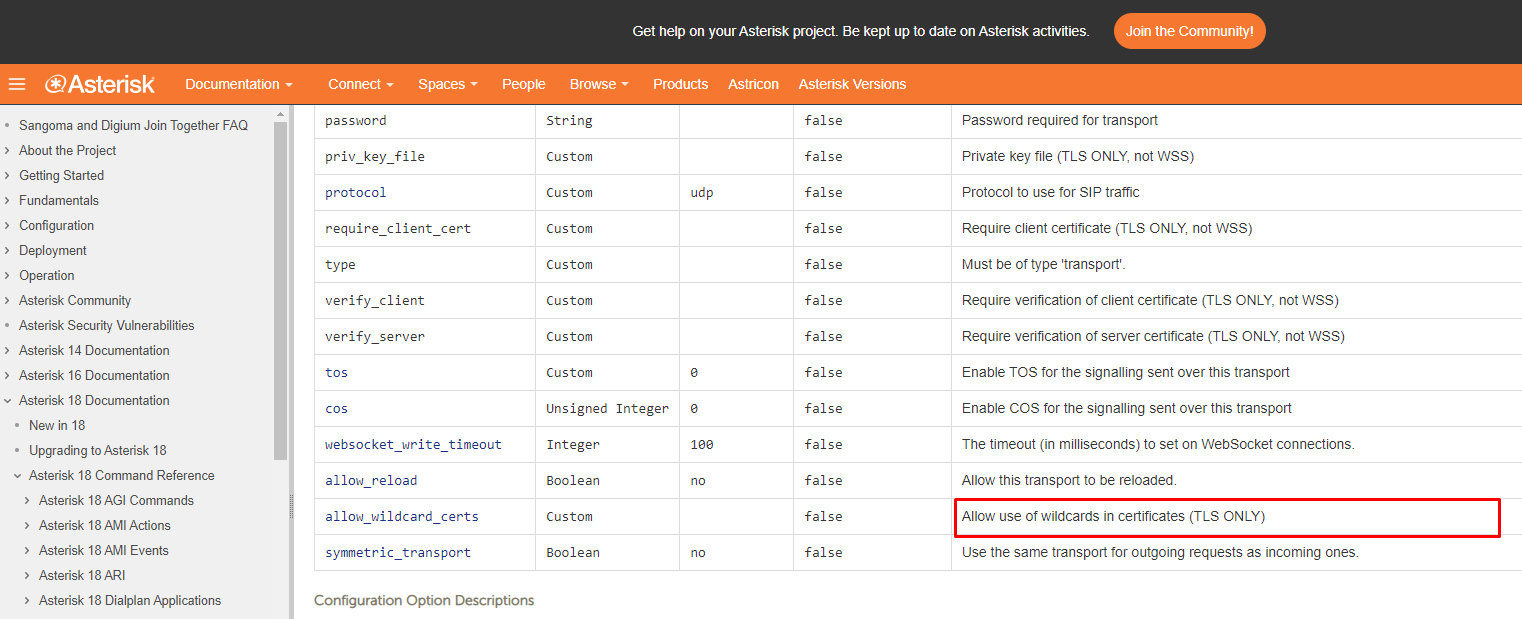
> Wildcard SSL certificate only recently got support in Asterisk
We can make this available on VitalPBX 4. Even though, this only applies to TLS and not to WSS, which is the protocol that uses the WebRTC applications.
---
### Author:  [@PitzKey](https://forums.vitalpbx.org/u/PitzKey)
#### Post date: [October 26, 2022, 6:28am UTC](https://forums.vitalpbx.org/t/webrtc-behind-firewall-squid-reverse-proxy-sophos-utm-help/1912/9 "2022-10-26T06:28:42Z")
So why isn’t wildcard SSLs allowed with WebRTC then?
---
### Author:  [@maynor](https://forums.vitalpbx.org/u/maynor)
#### Post date: [October 31, 2022, 5:02pm UTC](https://forums.vitalpbx.org/t/webrtc-behind-firewall-squid-reverse-proxy-sophos-utm-help/1912/10 "2022-10-31T17:02:00Z")
Hello Sir,
We are going to perform tests on our development servers. Any news about this will be posted in this topic.
Regards,
---
### Author:  [@PitzKey](https://forums.vitalpbx.org/u/PitzKey)
#### Post date: [November 7, 2022, 1:00pm UTC](https://forums.vitalpbx.org/t/webrtc-behind-firewall-squid-reverse-proxy-sophos-utm-help/1912/11 "2022-11-07T13:00:15Z")
Hi @maynor,
We have tried copying the SSL from the NGINX reverse proxy to the PBX, but we still get the error. However, we did not restart Asterisk after setting the SSL on the PBX.
Let me know if you need any additional information or if you want me to test something
Thank you
---
### Author:  [@david.henry](https://forums.vitalpbx.org/u/david.henry)
#### Post date: [November 7, 2022, 1:23pm UTC](https://forums.vitalpbx.org/t/webrtc-behind-firewall-squid-reverse-proxy-sophos-utm-help/1912/12 "2022-11-07T13:23:54Z")
Hi PitzKey,
For me , All works fine (except VitalPBX Mobile , I opened a case about it on helpdesk).
I use same Wildcard on VitalPBX and Sophos UTM (to protect access to it).
VitalPBX WebRTC works fine.
I didn’t tested with real phone (Yealink or anything else, I don’t need it now).
Regards
---
### Author:  [@mo10](https://forums.vitalpbx.org/u/mo10)
#### Post date: [November 7, 2022, 2:06pm UTC](https://forums.vitalpbx.org/t/webrtc-behind-firewall-squid-reverse-proxy-sophos-utm-help/1912/13 "2022-11-07T14:06:53Z")
> [@david.henry](#):
>
> except VitalPBX Mobile
Did you do ALL this?
> [@How to correctly configure VitalPBX Mobile](https://forums.vitalpbx.org/t/how-to-correctly-configure-vitalpbx-mobile/899):
>
> The new version of VitalPBX Mobile requires the following configuration to work correctly: You have to create a dedicated PJSIP account with two contacts as maximum. Don’t use the same account for other devices. e.g.: desktop phones or softphones. If you have a version earlier than 3.5.1-4 of VitalPBX, then disable the Push Notification option in VitalPBX. It is no longer necessary since the new App incorporates another methodology to do Push. On the App side, you only need to scan the QR code…
Allow the IP on your UTM as well!
---
### Author:  [@david.henry](https://forums.vitalpbx.org/u/david.henry)
#### Post date: [November 7, 2022, 2:22pm UTC](https://forums.vitalpbx.org/t/webrtc-behind-firewall-squid-reverse-proxy-sophos-utm-help/1912/14 "2022-11-07T14:22:24Z")
I can register an extension on VitalPBX Mobile.
(I use latest version of VitalPBX server : 3.2.3-5))
- Outside Network (on 4G/5G Mobile Network for exemple)
RTP doesn’t work on iPhone.
So no sound/voice.
- Inside Network (on same LAN)
RTP works without any issues.
I can make or receive call … but without sound.
Regards
---
### Author:  [@maynor](https://forums.vitalpbx.org/u/maynor)
#### Post date: [November 7, 2022, 3:23pm UTC](https://forums.vitalpbx.org/t/webrtc-behind-firewall-squid-reverse-proxy-sophos-utm-help/1912/15 "2022-11-07T15:23:32Z")
Hello Sir,
Can you access [https://server-address:8089/ws](https://server-address:8089/ws) ?
Could you please send a screenshot (without showing sensitive data) of your Nginx proxy configuration?
Regards,
---
### Author:  [@maynor](https://forums.vitalpbx.org/u/maynor)
#### Post date: [November 7, 2022, 3:26pm UTC](https://forums.vitalpbx.org/t/webrtc-behind-firewall-squid-reverse-proxy-sophos-utm-help/1912/16 "2022-11-07T15:26:35Z")
Does the VitXi WebRTC not have audio either?
You can check that the “Ice Support” option is enabled. This option can be found in the “RTP Settings” module.
Regards,
---
### Author:  [@mohamed.soliman](https://forums.vitalpbx.org/u/mohamed.soliman)
#### Post date: [November 7, 2022, 6:06pm UTC](https://forums.vitalpbx.org/t/webrtc-behind-firewall-squid-reverse-proxy-sophos-utm-help/1912/17 "2022-11-07T18:06:42Z")
ICE Hosts
add the advertised address and the local adress
---
### Author:  [@miguel](https://forums.vitalpbx.org/u/miguel)
#### Post date: [November 7, 2022, 6:22pm UTC](https://forums.vitalpbx.org/t/webrtc-behind-firewall-squid-reverse-proxy-sophos-utm-help/1912/18 "2022-11-07T18:22:01Z")
This got solved during a remote support session!!
---
### Author:  [@mohamed.soliman](https://forums.vitalpbx.org/u/mohamed.soliman)
#### Post date: [November 7, 2022, 6:33pm UTC](https://forums.vitalpbx.org/t/webrtc-behind-firewall-squid-reverse-proxy-sophos-utm-help/1912/19 "2022-11-07T18:33:54Z")
Please can share the solution for learning purpose 🙏
---
### Author:  [@mo10](https://forums.vitalpbx.org/u/mo10)
#### Post date: [November 7, 2022, 6:34pm UTC](https://forums.vitalpbx.org/t/webrtc-behind-firewall-squid-reverse-proxy-sophos-utm-help/1912/20 "2022-11-07T18:34:03Z")
> [@miguel](#):
>
> remote support session!!
What fixed it? Thanks
[Next page](https://forums.vitalpbx.org/t/webrtc-behind-firewall-squid-reverse-proxy-sophos-utm-help/1912.md?page=2)