# VPBX4 Phone BLF quit working and have to reboot phones
**URL:** https://forums.vitalpbx.org/t/vpbx4-phone-blf-quit-working-and-have-to-reboot-phones/2593
**Category:** VitalPBX
**Created:** [April 3, 2023, 5:35pm UTC](https://forums.vitalpbx.org/t/vpbx4-phone-blf-quit-working-and-have-to-reboot-phones/2593 "2023-04-03T17:35:57Z")
**Posts on this page:** 20
**Page:** 1
### Author:  [@rnbruce](https://forums.vitalpbx.org/u/rnbruce)
#### Post date: [April 3, 2023, 5:35pm UTC](https://forums.vitalpbx.org/t/vpbx4-phone-blf-quit-working-and-have-to-reboot-phones/2593/1 "2023-04-03T17:35:57Z")
Yealink phones blf indicators quit showing extensions status. Reboot the phones and will start working.
---
### Author:  [@BaileyMcDougal](https://forums.vitalpbx.org/u/BaileyMcDougal)
#### Post date: [May 15, 2023, 8:11pm UTC](https://forums.vitalpbx.org/t/vpbx4-phone-blf-quit-working-and-have-to-reboot-phones/2593/2 "2023-05-15T20:11:00Z")
Same issue here… Been troubleshooting internally for a few days. Trying to determine if its a Vital problem or Yealink problem. My tests are inconclusive so far. My environment is difficult to troubleshoot as I use the VPN client on the phones. All the SIP traffic is in the tunnel. So PCAP is useless.
Any input as to what may be causing this would be greatly appreciated.
---
### Author:  [@rnbruce](https://forums.vitalpbx.org/u/rnbruce)
#### Post date: [May 17, 2023, 2:24pm UTC](https://forums.vitalpbx.org/t/vpbx4-phone-blf-quit-working-and-have-to-reboot-phones/2593/3 "2023-05-17T14:24:57Z")
There has not been any change here. My customer is living with it but it does not look good on the system. I’ve had multiple issues BLF included with PJSIP which we are forced to use now.
---
### Author:  [@miguel](https://forums.vitalpbx.org/u/miguel)
#### Post date: [May 18, 2023, 5:48pm UTC](https://forums.vitalpbx.org/t/vpbx4-phone-blf-quit-working-and-have-to-reboot-phones/2593/4 "2023-05-18T17:48:35Z")
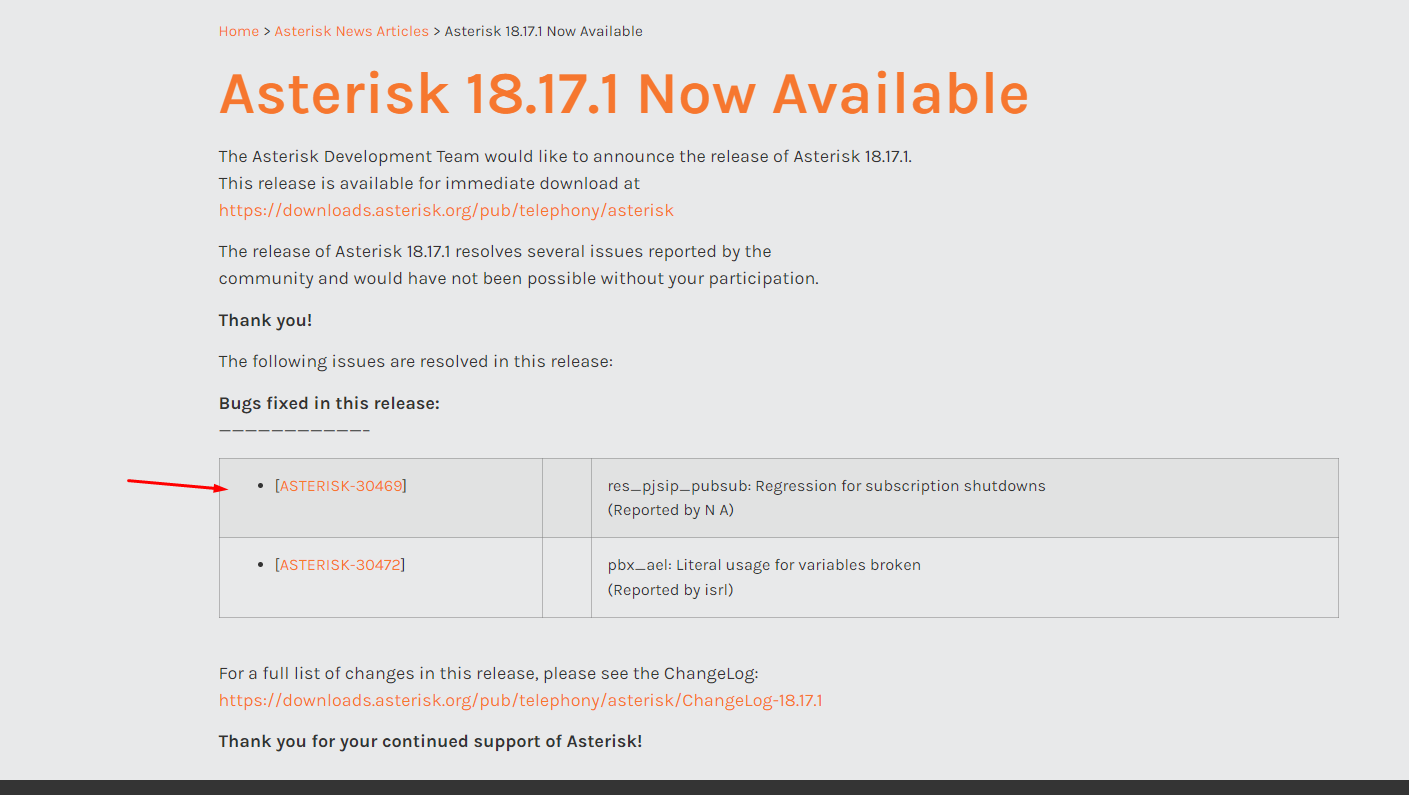
Try updating to the latest VitalPBX version that comes with Asterisk 18.17.1
> [@Introducing VitalPBX v4.0.3 R3 - Exciting Fixes, Enhancements, and Asterisk 18.17.1 Update!](https://forums.vitalpbx.org/t/introducing-vitalpbx-v4-0-3-r3-exciting-fixes-enhancements-and-asterisk-18-17-1-update/2767):
>
> Dear Community Members, We are thrilled to announce the release of the latest version of VitalPBX! This new update brings forth a range of important fixes, exciting improvements, and an upgrade to Asterisk 18.17.1. We believe this version will greatly enhance your telephony experience, improve system stability, and deliver an even more robust communication platform for your business needs. We want to express our sincere gratitude to our community members for their continued support, valuable f…
The latest version of Asterisk 18 seems to come with a fix related to your issue.
---
### Author:  [@rnbruce](https://forums.vitalpbx.org/u/rnbruce)
#### Post date: [May 31, 2023, 8:04pm UTC](https://forums.vitalpbx.org/t/vpbx4-phone-blf-quit-working-and-have-to-reboot-phones/2593/5 "2023-05-31T20:04:11Z")
It appears the BLF is still intermittent after the the update.
---
### Author:  [@Klemen](https://forums.vitalpbx.org/u/Klemen)
#### Post date: [June 5, 2023, 7:54am UTC](https://forums.vitalpbx.org/t/vpbx4-phone-blf-quit-working-and-have-to-reboot-phones/2593/6 "2023-06-05T07:54:30Z")
We are experiencing the same issue in VitalPBX v3 latest update with Fanvil devices. We noticed, that VitalPBX stops sending SIP.METHOD NOTIFY after a short amount of time.
Please help in resolving this issue.
---
### Author:  [@miguel](https://forums.vitalpbx.org/u/miguel)
#### Post date: [June 6, 2023, 4:33pm UTC](https://forums.vitalpbx.org/t/vpbx4-phone-blf-quit-working-and-have-to-reboot-phones/2593/7 "2023-06-06T16:33:52Z")
You can try reporting that to Asterisk Team. In the end, VitalPBX is an abstraction layer for Asterisk.
On the other hand, make sure your Network restrictions or Phone configurations don’t interfere with the Asterisk Notifications.
---
### Author:  [@rnbruce](https://forums.vitalpbx.org/u/rnbruce)
#### Post date: [June 28, 2023, 5:59pm UTC](https://forums.vitalpbx.org/t/vpbx4-phone-blf-quit-working-and-have-to-reboot-phones/2593/8 "2023-06-28T17:59:55Z")
Still having issues with the notifications. Same phones worked great with another system and SIP settings. On another system VitalPBX3.x I initially set them all up under PJSIP. Had all kind of issues with no audio, one way audio, lights not working and had to move them all to SIP. I have license on both of these systems. Are there any experts with VitalPBX that can help with the issues? I have other very large users with enterprise license on the vitalpbx. Having to move them to PJSIP will be a nightmare.
---
### Author:  [@PitzKey](https://forums.vitalpbx.org/u/PitzKey)
#### Post date: [July 31, 2023, 10:08pm UTC](https://forums.vitalpbx.org/t/vpbx4-phone-blf-quit-working-and-have-to-reboot-phones/2593/9 "2023-07-31T22:08:50Z")
Confirming that this is still an issue with the latest version of VitalPBX4 (with Asterisk 18.17.1)
We can only file an issue if we use the current version of Asterisk, which is 18.19.0… So there is no way we can file an issue if VitalPBX is two versions behind.
Perhaps there is a dev repo we can use to test?
Thanks
---
### Author:  [@PitzKey](https://forums.vitalpbx.org/u/PitzKey)
#### Post date: [August 3, 2023, 5:40pm UTC](https://forums.vitalpbx.org/t/vpbx4-phone-blf-quit-working-and-have-to-reboot-phones/2593/10 "2023-08-03T17:40:41Z")
@miguel @admin This is a serious issue. Can you please assist here?
---
### Author:  [@miguel](https://forums.vitalpbx.org/u/miguel)
#### Post date: [August 3, 2023, 6:05pm UTC](https://forums.vitalpbx.org/t/vpbx4-phone-blf-quit-working-and-have-to-reboot-phones/2593/11 "2023-08-03T18:05:47Z")
Does the version 18.19.0 fix the issue? Have you tested?
---
### Author:  [@PitzKey](https://forums.vitalpbx.org/u/PitzKey)
#### Post date: [August 3, 2023, 6:13pm UTC](https://forums.vitalpbx.org/t/vpbx4-phone-blf-quit-working-and-have-to-reboot-phones/2593/12 "2023-08-03T18:13:53Z")
I don’t know if it is fixed in that version. But in order to be able to report this as an issue on the Asterisk issue tracker we need to use that version.
---
### Author:  [@PitzKey](https://forums.vitalpbx.org/u/PitzKey)
#### Post date: [August 7, 2023, 5:32pm UTC](https://forums.vitalpbx.org/t/vpbx4-phone-blf-quit-working-and-have-to-reboot-phones/2593/13 "2023-08-07T17:32:23Z")
OK. I made some progress. I tested with another Asterisk Distro and I think I see the issue.
On the other distro, when DND is enabled, we see:
```auto
[root@asterisk9 ~]# asterisk -x"core show hints" | grep 6406
6406@ext-local : PJSIP/6406&PJSIP/996 State:Busy Presence:available Watchers 1
```
When DND is disabled:
```auto
[root@asterisk9 ~]# asterisk -x"core show hints" | grep 6406
6406@ext-local : PJSIP/6406&PJSIP/996 State:Idle Presence:available Watchers 1
```
* * *
With VitalPBX, when DND is enabled, we see:
```auto
root@VitalPBX3:~# asterisk -x"core show hints" | grep DND_105@T3
DND_105@T3_extension: Custom:T3_DND_105 State:InUse Presence:not_set Watchers 4
```
BUT… When DND is disabled, we see:
```auto
root@VitalPBX3:~# asterisk -x"core show hints" | grep DND_105@T3
DND_105@T3_extension: Custom:T3_DND_105 State:Unavailable Presence:not_set Watchers 4
```
Notice the **Unavailable**.
Is there a way we can set that to Idle?
---
### Author:  [@miguel](https://forums.vitalpbx.org/u/miguel)
#### Post date: [August 8, 2023, 4:45pm UTC](https://forums.vitalpbx.org/t/vpbx4-phone-blf-quit-working-and-have-to-reboot-phones/2593/14 "2023-08-08T16:45:57Z")
When your phone is unregistered, you will see what you said:

After connecting the phone, you will see the Idle status:

As far as I remember, someone requested to change from Idle to Unavailable because of queues.
---
### Author:  [@PitzKey](https://forums.vitalpbx.org/u/PitzKey)
#### Post date: [August 8, 2023, 5:07pm UTC](https://forums.vitalpbx.org/t/vpbx4-phone-blf-quit-working-and-have-to-reboot-phones/2593/15 "2023-08-08T17:07:02Z")
I am referring to the DND\_EXT (DND\_105) hint, it is a total different hint.
---
### Author:  [@miguel](https://forums.vitalpbx.org/u/miguel)
#### Post date: [August 8, 2023, 5:07pm UTC](https://forums.vitalpbx.org/t/vpbx4-phone-blf-quit-working-and-have-to-reboot-phones/2593/16 "2023-08-08T17:07:58Z")
The ticket is related to the BLF in general. It has nothing to do with the status used for the DND hints.
---
### Author:  [@PitzKey](https://forums.vitalpbx.org/u/PitzKey)
#### Post date: [August 8, 2023, 6:11pm UTC](https://forums.vitalpbx.org/t/vpbx4-phone-blf-quit-working-and-have-to-reboot-phones/2593/17 "2023-08-08T18:11:19Z")
Indeed. However, no one mentioned here what type of BLFs they were using. So… I am doing the work to dig deeper.
Jose, have you tried reproducing what I mentioned?
---
### Author:  [@miguel](https://forums.vitalpbx.org/u/miguel)
#### Post date: [August 8, 2023, 9:13pm UTC](https://forums.vitalpbx.org/t/vpbx4-phone-blf-quit-working-and-have-to-reboot-phones/2593/18 "2023-08-08T21:13:54Z")
The DND was changed from “IDLE” to “UNAVAILABLE” because when the agents got disconnected/unreachable the extension was flagged as “Idle” because of the DND status. So, the queues tried dialing un-register agents logged in as “Static Members.”
But again, I guess this has nothing to do with the initial issue.
Anyway, if you want, you can update to the latest Asterisk version(18.19.0) using the Linux CLI. We uploaded the packages today.
---
### Author:  [@rnbruce](https://forums.vitalpbx.org/u/rnbruce)
#### Post date: [September 13, 2023, 6:34pm UTC](https://forums.vitalpbx.org/t/vpbx4-phone-blf-quit-working-and-have-to-reboot-phones/2593/19 "2023-09-13T18:34:43Z")
Since the last upgrade I have not heard complaints on this so hopefully this is working better.
---
### Author:  [@fdeutsch51](https://forums.vitalpbx.org/u/fdeutsch51)
#### Post date: [November 29, 2023, 2:52pm UTC](https://forums.vitalpbx.org/t/vpbx4-phone-blf-quit-working-and-have-to-reboot-phones/2593/20 "2023-11-29T14:52:55Z")
I also had this issue with VPBX3 it seems to be working now on v3.2.5-2 with Asterisk 18.12.1-1
Thanks