# Sending calls to a shared voicemail box
**URL:** https://forums.vitalpbx.org/t/sending-calls-to-a-shared-voicemail-box/6137
**Category:** VitalPBX
**Created:** [March 27, 2026, 5:00pm UTC](https://forums.vitalpbx.org/t/sending-calls-to-a-shared-voicemail-box/6137 "2026-03-27T17:00:39Z")
**Posts on this page:** 8
**Page:** 1
### Author:  [@RPitts1SP](https://forums.vitalpbx.org/u/RPitts1SP)
#### Post date: [March 27, 2026, 5:00pm UTC](https://forums.vitalpbx.org/t/sending-calls-to-a-shared-voicemail-box/6137/1 "2026-03-27T17:00:39Z")
I have read the thread “Multiple extension sharing single voicemail,” but it didn’t quite help me. We often have clients who use either share only a single voicemail box, or use a shared voicemail box for some calls or extensions, and have individual mailboxes for everyone else. I understand how to create a “dummy” extension with the Device technology set to NONE, and to toggle that extension’s Voicemail Generate Hint to YES, and adding vm\_EXT to the DSS BLF to create a custom voicemail message button. However, I am still having trouble understanding how to send unanswered calls to extension to a voicemail box other than its own if I have a situation where I want to send calls to a shared voicemail box. I don’t want to create a ring group for each extension that needs to use this shared voicemail box. I don’t see an option under an extension’s Follow Me tab for this, unless after enabling FM, there is something special like vm\_EXT (with EXT being exchanged with the shared voicemail box number) I could add in the Follow Me List field to send calls to a shared voicemail box. Please help. This is such a common request from our clients, and it just seems like there should be an easy way to do this, I just don’t know what it is.
---
### Author:  [@miguel](https://forums.vitalpbx.org/u/miguel)
#### Post date: [March 27, 2026, 5:01pm UTC](https://forums.vitalpbx.org/t/sending-calls-to-a-shared-voicemail-box/6137/2 "2026-03-27T17:01:25Z")
Set up the Call Forward on No Answer/Unavailable, pointing to the Shared Voicemail.
---
### Author:  [@RPitts1SP](https://forums.vitalpbx.org/u/RPitts1SP)
#### Post date: [March 31, 2026, 11:10pm UTC](https://forums.vitalpbx.org/t/sending-calls-to-a-shared-voicemail-box/6137/3 "2026-03-31T23:10:29Z")
I am new to VitalPBX. I do not see a Call Forward on a No Answer/Unavailable on extension settings. What am I missing? I am used to MiRTA, where a No Answer, Busy, or Offline destinations are set under an extension’s Additional Destinations section. The closest thing I see in Vital’s extensions settings is the FollowMe tab.
---
### Author:  [@mo10](https://forums.vitalpbx.org/u/mo10)
#### Post date: [April 1, 2026, 5:38am UTC](https://forums.vitalpbx.org/t/sending-calls-to-a-shared-voicemail-box/6137/4 "2026-04-01T05:38:21Z")
In the search bar type: extension status
---
### Author:  [@RPitts1SP](https://forums.vitalpbx.org/u/RPitts1SP)
#### Post date: [April 22, 2026, 5:09pm UTC](https://forums.vitalpbx.org/t/sending-calls-to-a-shared-voicemail-box/6137/5 "2026-04-22T17:09:59Z")
I’m sorry, but I do not understand how to do this. Can you please elaborate? I do not see anything like that in an extension’s settings. Is this somehow set in the Follow Me or Incoming Routes tabs?
---
### Author:  [@miguel](https://forums.vitalpbx.org/u/miguel)
#### Post date: [April 24, 2026, 8:17pm UTC](https://forums.vitalpbx.org/t/sending-calls-to-a-shared-voicemail-box/6137/6 "2026-04-24T20:17:00Z")
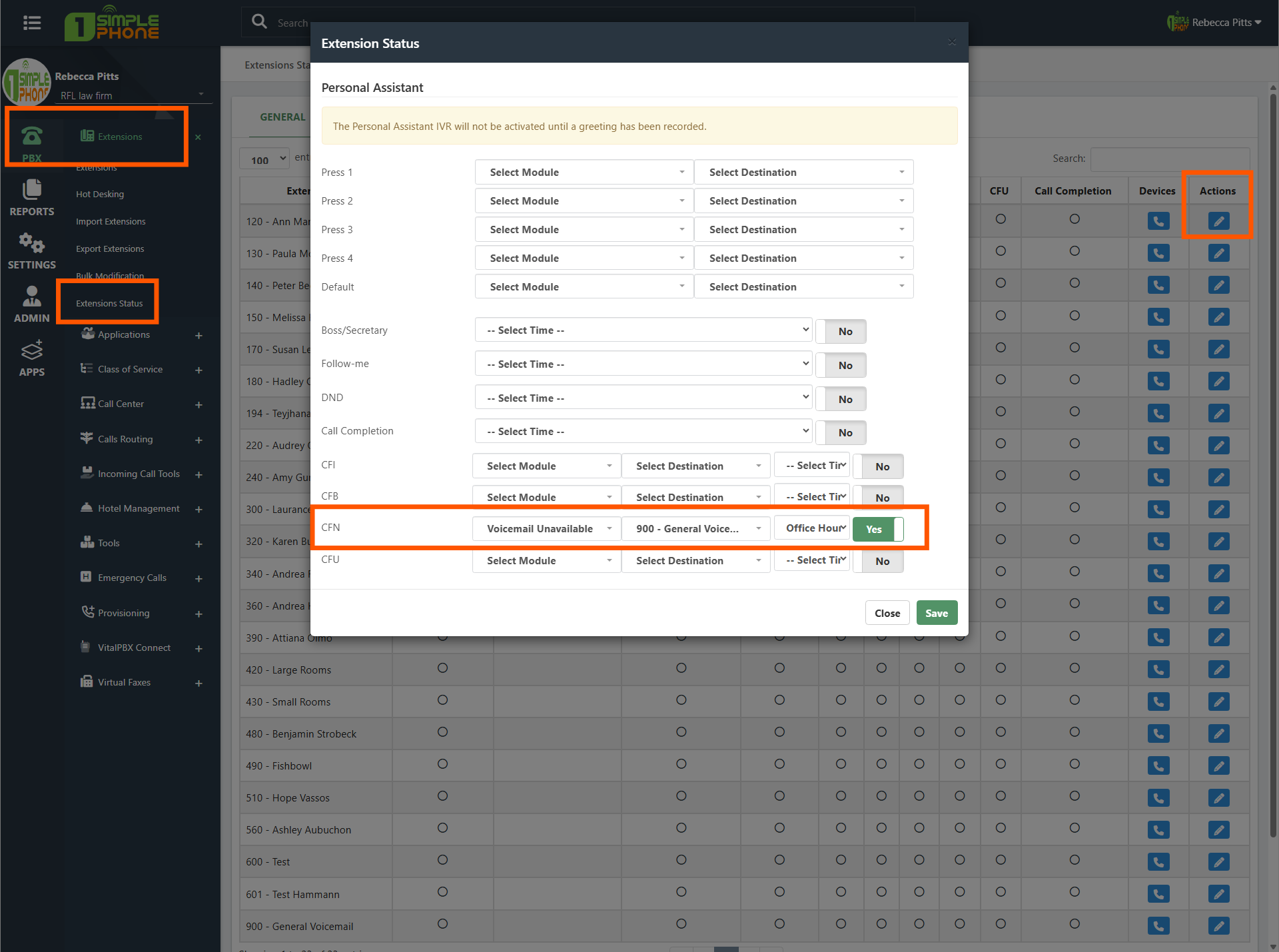
Use the Extensions Status module to set up any Diversion/Call Forward
---
### Author:  [@RPitts1SP](https://forums.vitalpbx.org/u/RPitts1SP)
#### Post date: [April 24, 2026, 10:23pm UTC](https://forums.vitalpbx.org/t/sending-calls-to-a-shared-voicemail-box/6137/7 "2026-04-24T22:23:27Z")
Wow! Thank you. I think I finally get it (PBX \> Extensions \> Extension Status). I still have so much to learn and get used to with VitalPBX. Do you mean like this image? Would something like this override the extension’s Voicemail tab settings in PBX \> Extensions \> Extensions (or even in tabs for Advanced, Follow Me, or Incoming Routes)?
---
### Author:  [@system](https://forums.vitalpbx.org/u/system)
#### Post date: [May 24, 2026, 10:23pm UTC](https://forums.vitalpbx.org/t/sending-calls-to-a-shared-voicemail-box/6137/8 "2026-05-24T22:23:37Z")
This topic was automatically closed 30 days after the last reply. New replies are no longer allowed.