# Permission Denied error when attempting to send fax via web UI.
**URL:** https://forums.vitalpbx.org/t/permission-denied-error-when-attempting-to-send-fax-via-web-ui/4047
**Category:** Reporting an Issue
**Created:** [May 2, 2024, 9:28pm UTC](https://forums.vitalpbx.org/t/permission-denied-error-when-attempting-to-send-fax-via-web-ui/4047 "2024-05-02T21:28:53Z")
**Posts on this page:** 10
**Page:** 1
### Author:  [@zachz](https://forums.vitalpbx.org/u/zachz)
#### Post date: [May 2, 2024, 9:28pm UTC](https://forums.vitalpbx.org/t/permission-denied-error-when-attempting-to-send-fax-via-web-ui/4047/1 "2024-05-02T21:28:53Z")

It seems I am unable to send faxes using the web ui.
I’ve run `vitalpbx --check-integrity` as well as attempted the other fixes found here: [Fax not working](https://forums.vitalpbx.org/t/fax-not-working/2336) but none of those have worked.
Any other fixes to try?
---
### Author:  [@mo10](https://forums.vitalpbx.org/u/mo10)
#### Post date: [May 3, 2024, 3:02am UTC](https://forums.vitalpbx.org/t/permission-denied-error-when-attempting-to-send-fax-via-web-ui/4047/2 "2024-05-03T03:02:18Z")
How about those 3 lines?
> [@Unable to delete tenant - API Error](https://forums.vitalpbx.org/t/unable-to-delete-tenant-api-error/4008/7):
>
> You are correct. Somehow it didn’t fully update. I ran the below commands from the CLI and rebooted. Once it came back up it is now able to remove multi-tenants without error. sudo apt clean all sudo apt update sudo apt upgrade -y Many thanks.
---
### Author:  [@zachz](https://forums.vitalpbx.org/u/zachz)
#### Post date: [May 3, 2024, 2:46pm UTC](https://forums.vitalpbx.org/t/permission-denied-error-when-attempting-to-send-fax-via-web-ui/4047/3 "2024-05-03T14:46:16Z")
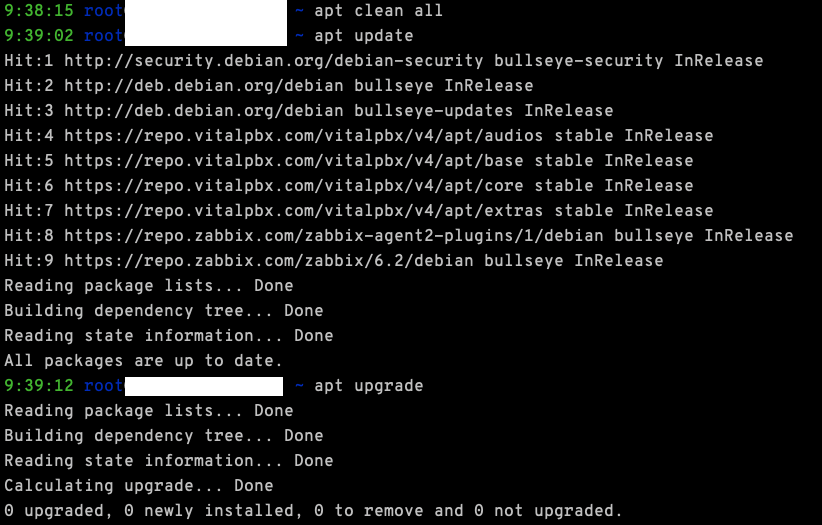
All packages are up to date.
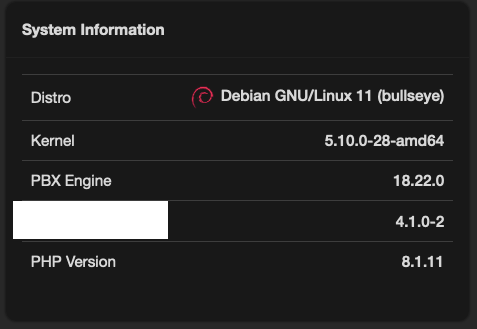
Virtual Faxes addon shows as 4.0.1-2
---
### Author:  [@zachz](https://forums.vitalpbx.org/u/zachz)
#### Post date: [May 3, 2024, 3:13pm UTC](https://forums.vitalpbx.org/t/permission-denied-error-when-attempting-to-send-fax-via-web-ui/4047/4 "2024-05-03T15:13:12Z")
I also re-installed the virtual faxes add-on through the add-ons manager page. Same error.
---
### Author:  [@mo10](https://forums.vitalpbx.org/u/mo10)
#### Post date: [May 3, 2024, 4:29pm UTC](https://forums.vitalpbx.org/t/permission-denied-error-when-attempting-to-send-fax-via-web-ui/4047/5 "2024-05-03T16:29:26Z")
EDIT:
YES you did this. Lets see if somebody else has an idea.
Please tell me if you did this:
```auto
sudo apt clean all
sudo apt update
sudo apt upgrade -y
```
---
### Author:  [@mo10](https://forums.vitalpbx.org/u/mo10)
#### Post date: [May 3, 2024, 5:00pm UTC](https://forums.vitalpbx.org/t/permission-denied-error-when-attempting-to-send-fax-via-web-ui/4047/6 "2024-05-03T17:00:27Z")
No problem here on latest Vital4, but it is a relatively clean installation.
Share the permissions of the error files and folders in the error message.
---
### Author:  [@zachz](https://forums.vitalpbx.org/u/zachz)
#### Post date: [May 3, 2024, 5:24pm UTC](https://forums.vitalpbx.org/t/permission-denied-error-when-attempting-to-send-fax-via-web-ui/4047/7 "2024-05-03T17:24:11Z")
> **[12:17:36 root@PBX1.XXXXXXXXX.net fax pwd -P/var/lib/vitalpbx/fax12:17:38 roo...](https://pastebin.com/GaVj9k7r)**
>
> Pastebin.com is the number one paste tool since 2002. Pastebin is a website where you can store text online for a set period of time.
---
### Author:  [@zachz](https://forums.vitalpbx.org/u/zachz)
#### Post date: [May 3, 2024, 5:34pm UTC](https://forums.vitalpbx.org/t/permission-denied-error-when-attempting-to-send-fax-via-web-ui/4047/8 "2024-05-03T17:34:24Z")
I just saw as I was creating that pastebin post, the ‘virtual\_faxes.php’ file was user:group root:root. Changing that to www-data:www-data did NOT solve the issue.
---
### Author:  [@miguel](https://forums.vitalpbx.org/u/miguel)
#### Post date: [May 3, 2024, 9:13pm UTC](https://forums.vitalpbx.org/t/permission-denied-error-when-attempting-to-send-fax-via-web-ui/4047/9 "2024-05-03T21:13:18Z")
Run the commands below using root privileges!
```auto
chown www-data:asterisk /var/lib/vitalpbx/fax
chown asterisk:www-data /var/lib/vitalpbx/fax/recvd
chown asterisk:www-data /var/lib/vitalpbx/fax/sent
chmod 2775 /var/lib/vitalpbx/fax
chmod 2775 /var/lib/vitalpbx/fax/recvd
chmod 2775 /var/lib/vitalpbx/fax/sent
```
---
### Author:  [@zachz](https://forums.vitalpbx.org/u/zachz)
#### Post date: [May 6, 2024, 1:35pm UTC](https://forums.vitalpbx.org/t/permission-denied-error-when-attempting-to-send-fax-via-web-ui/4047/10 "2024-05-06T13:35:32Z")
No luck, same error.