### Author:  [@intelesync](https://forums.vitalpbx.org/u/intelesync)
#### Post date: [July 27, 2021, 8:35pm UTC](https://forums.vitalpbx.org/t/no-call-audio-after-update-to-1-0-5-6/161/1 "2021-07-27T20:35:01Z")
It appears that ever since the VPBX update to 3.1.0-1 and VitXi update to 1.0.5-6, not getting any call audio. The mic is working. Camera is working. Keypresses are sending back audio, but no call audio. The only change from last week when it worked and this week when it doesn’t is the update.
---
### Author:  [@maynor](https://forums.vitalpbx.org/u/maynor)
#### Post date: [July 27, 2021, 9:35pm UTC](https://forums.vitalpbx.org/t/no-call-audio-after-update-to-1-0-5-6/161/2 "2021-07-27T21:35:21Z")
Hi Sir,
No audio in both directions? or only in one direction, there is no audio?
---
### Author:  [@PitzKey](https://forums.vitalpbx.org/u/PitzKey)
#### Post date: [July 28, 2021, 9:36am UTC](https://forums.vitalpbx.org/t/no-call-audio-after-update-to-1-0-5-6/161/3 "2021-07-28T09:36:35Z")
There’s two things that I can think of.
1. In the recent update, a new MS Teams add-on was introduced, and it may or may not cause issues if not configured properly. If you have it installed, try uninstalling it.
2. Your network settings are misconfigured, and since Asterisk is restarted when updating the PBX, it probably started sending/listening [for] traffic on a wrong address.
To troubleshoot, please describe your network and setup, and then at the asterisk console enable PJSIP debugging
```auto
pjsip set logger on
```
Or if there is too much “noise” from other extensions, you can run:
```auto
pjsip set logger host
```
Dial \*72 to run a echo test.
Copy/paste to [pastebin.com](http://pastebin.com) and post the link here.
---
### Author:  [@intelesync](https://forums.vitalpbx.org/u/intelesync)
#### Post date: [July 28, 2021, 1:22pm UTC](https://forums.vitalpbx.org/t/no-call-audio-after-update-to-1-0-5-6/161/4 "2021-07-28T13:22:10Z")
I reemphasize… No changes were made to VitalPBX nor VitXi web, other than the update.
Kind of difficult to do an echo test when you can’t hear the echo. lol
Look, I put this out here in the public forum to see if others are seeing the same problem. The problem also occurs in VitXi+ mobile app. The common denominator is the ‘Default WebRTC Profile’ that the extensions/devices are using. If I tell VitXi+ to use the default extension device which uses the ‘Default PJSIP Profile’, it works fine.
We’re using PJSIP port 5062. Maynor I’d start there to see if that’s where all this is originating from. Others may not be reporting this problem since they’re using 5060. I’m in the way-back club now of users who migrated from v2 to v3.
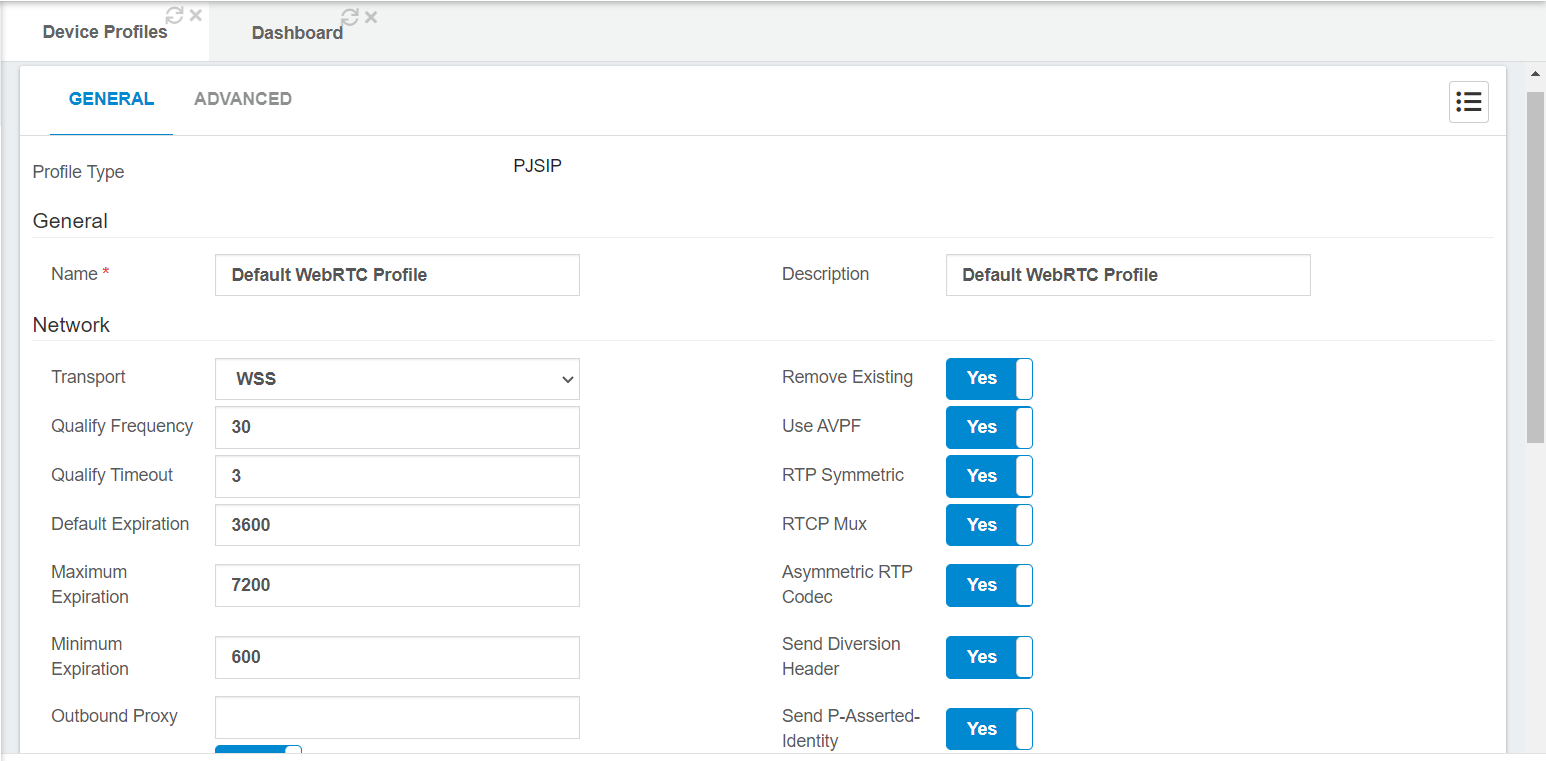
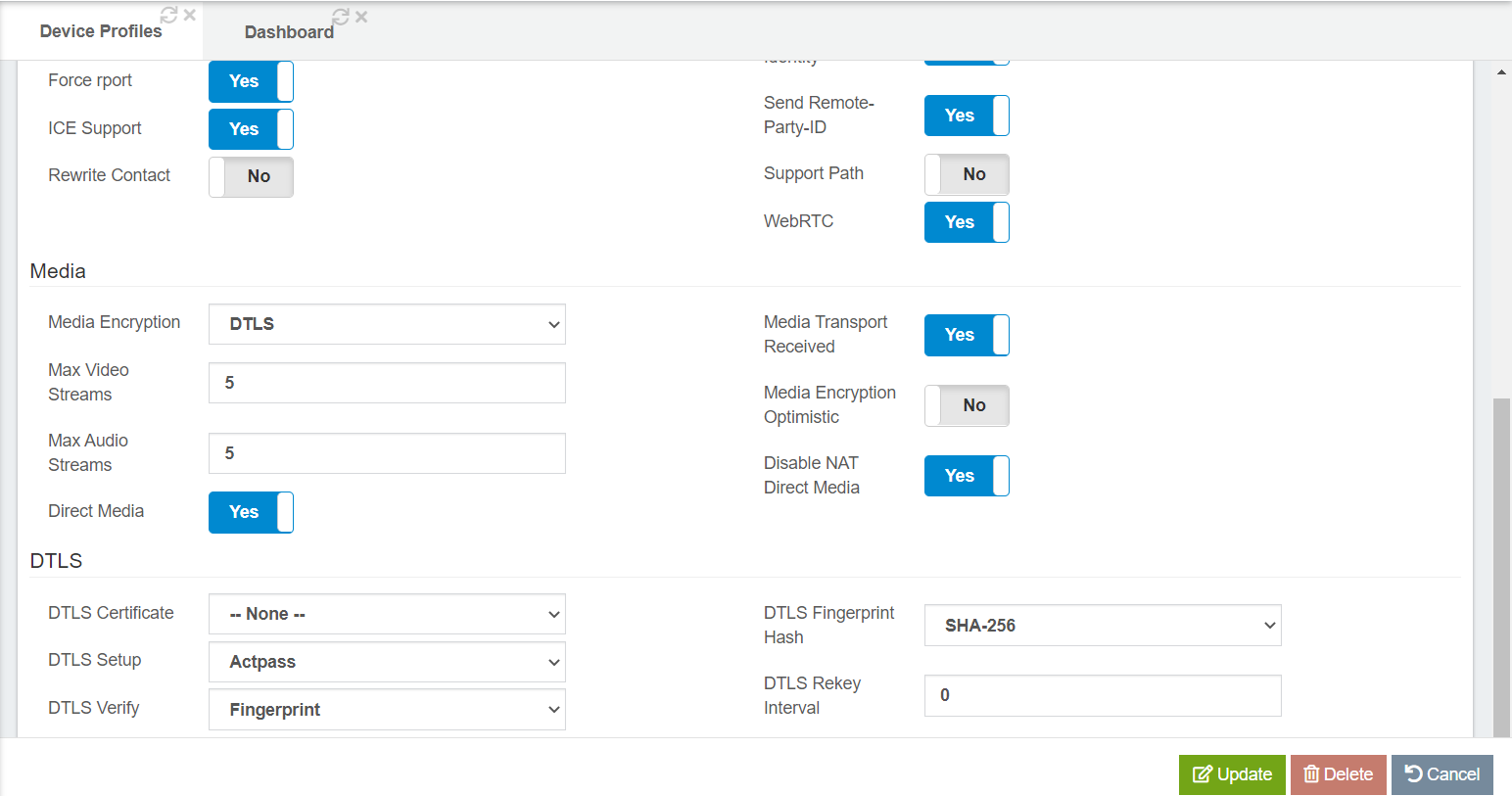
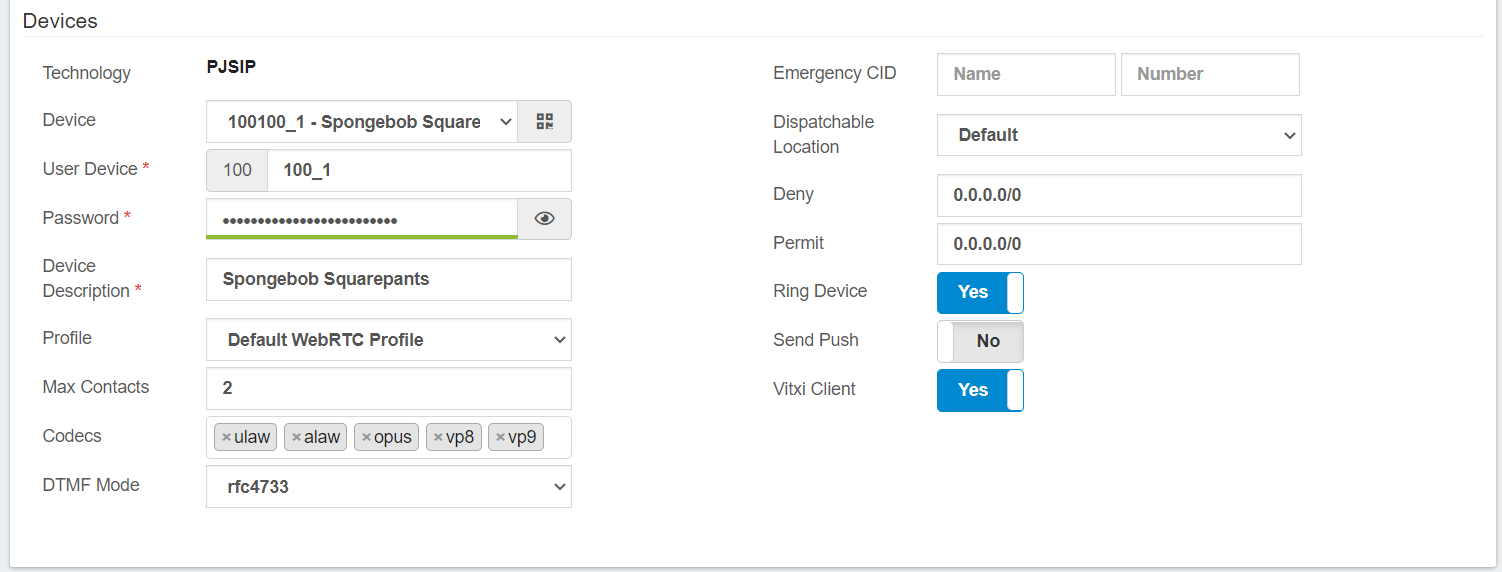
WebRTC profile settings:
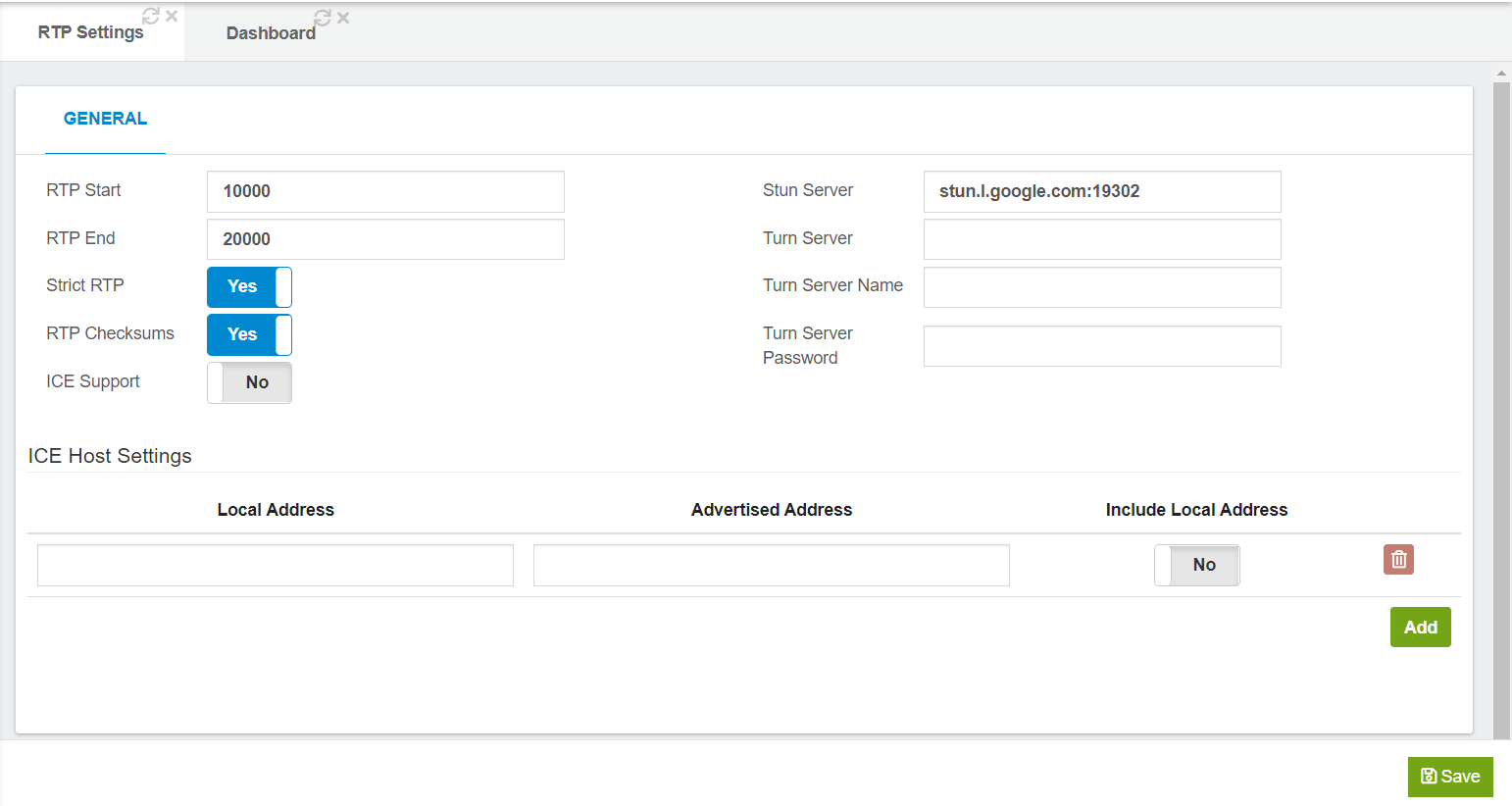
RTP settings:
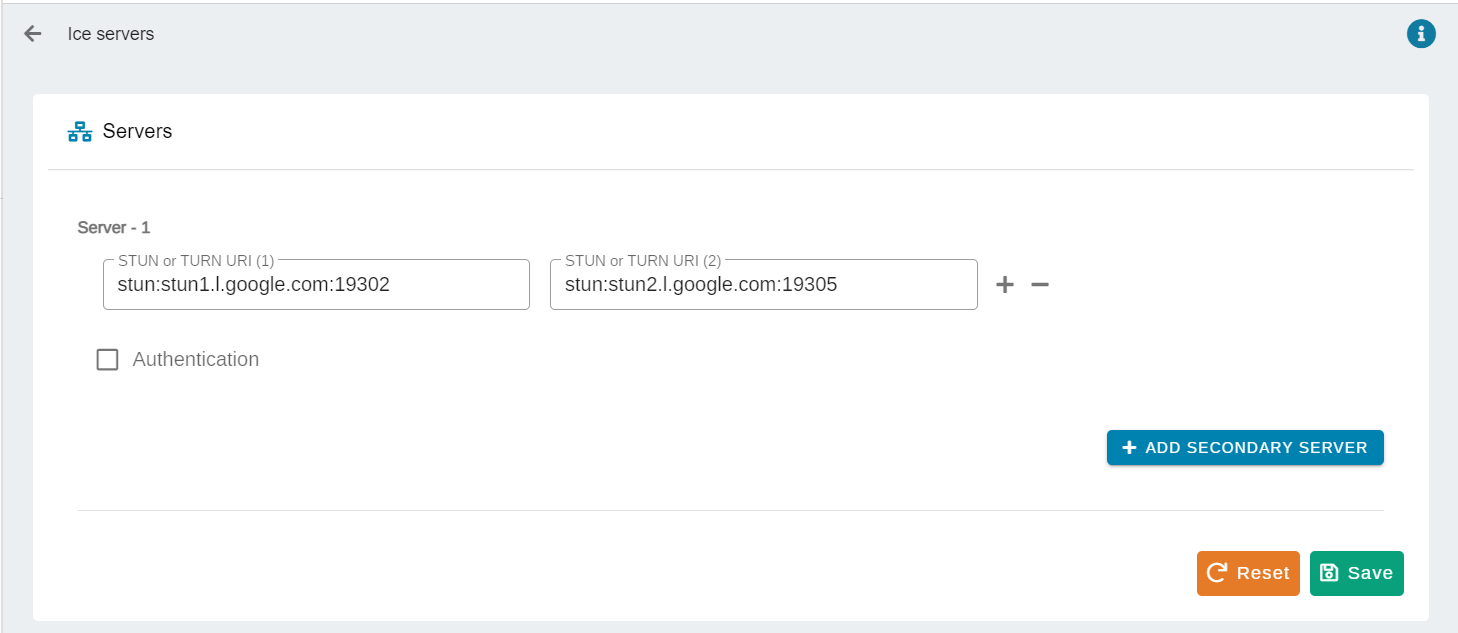
VitXi web ICE settings:
---
### Author:  [@maynor](https://forums.vitalpbx.org/u/maynor)
#### Post date: [July 28, 2021, 3:20pm UTC](https://forums.vitalpbx.org/t/no-call-audio-after-update-to-1-0-5-6/161/5 "2021-07-28T15:20:07Z")
In the WebRTC profile you must select the SSL certificate in the “ **DTLS Certificate** ” field, also disable the “ **Direct Media** ” and the “ **Asymmetric RTP Codec** ”.
Remember that for the devices that will be used in VitXi Mobile, you must assign them the **PJSIP profile** , and for the devices that will be used in VitXi WebRTC, you must assign them the **WebRTC profile**. These are due to the differences in their configurations so that they work correctly.
Also, we inform you that the new version of VitXi WebRTC is now available!
You can see our changelog at the following link: [VitalPBX Phone System | Change Log](https://www.vitalpbx.org/vitxi-webrtc-phone-changes-log/)
---
### Author:  [@intelesync](https://forums.vitalpbx.org/u/intelesync)
#### Post date: [July 28, 2021, 3:54pm UTC](https://forums.vitalpbx.org/t/no-call-audio-after-update-to-1-0-5-6/161/6 "2021-07-28T15:54:29Z")
I am aware of the profile assignment requirement. That is why I specifically included screenshots of that WebRTC profile. Below is a screenshot of an extension assigned to that profile.
I must apparently reiterate vociferously… We had a fully functioning VitXi WebRTC system with many users using the tool, both web and mobile. It BROKE as soon as we did the VitalPBX update over this past weekend. We did not install the Microsoft Teams plugin. I personally cannot fathom why anyone would do that on a platform that already supplies VitXi, but that’s here nor there.
Something under the hood changed and broke the audio for VitXi clients. We’re using PJSIP port 5062. All other aspects of the VitalPBX system are nominal. Just did the update of VitXi to 1.0.6-1. Very pretty, but still no audio.
---
### Author:  [@maynor](https://forums.vitalpbx.org/u/maynor)
#### Post date: [July 28, 2021, 4:08pm UTC](https://forums.vitalpbx.org/t/no-call-audio-after-update-to-1-0-5-6/161/7 "2021-07-28T16:08:49Z")
Oh ok, I understand.
Some settings may not have been preserved.
Make the following settings in the “ **RTP Settings** ” module:
1. Disable Strict RTP.
2. Disable RTP Checksums.
3. Enable ICE Support.
---
### Author:  [@intelesync](https://forums.vitalpbx.org/u/intelesync)
#### Post date: [July 28, 2021, 4:25pm UTC](https://forums.vitalpbx.org/t/no-call-audio-after-update-to-1-0-5-6/161/8 "2021-07-28T16:25:07Z")
Made the above recommended changes. Still no audio from VitXi web nor mobile.
---
### Author:  [@PitzKey](https://forums.vitalpbx.org/u/PitzKey)
#### Post date: [July 28, 2021, 5:26pm UTC](https://forums.vitalpbx.org/t/no-call-audio-after-update-to-1-0-5-6/161/9 "2021-07-28T17:26:56Z")
> [@intelesync](#):
>
> I reemphasize… No changes were made to VitalPBX nor VitXi web, other than the update.
If you make a network change, it sometimes won’t go into affect until Asterisk is restarted.
> [@intelesync](#):
>
> Kind of difficult to do an echo test when you can’t hear the echo. lol
You are missing the point… This is part of the troubleshooting steps along with gathering the logs.
Guessing is always hard, once we understand your network setup and can see the SIP trace and Asterisk logs, we might get a clue on whats wrong.
---
### Author:  [@maynor](https://forums.vitalpbx.org/u/maynor)
#### Post date: [July 28, 2021, 5:42pm UTC](https://forums.vitalpbx.org/t/no-call-audio-after-update-to-1-0-5-6/161/10 "2021-07-28T17:42:41Z")
Also, if your PBX server is behind a one-to-one NAT, you will need to define which IP addresses will be exposed during the ICE negotiations.
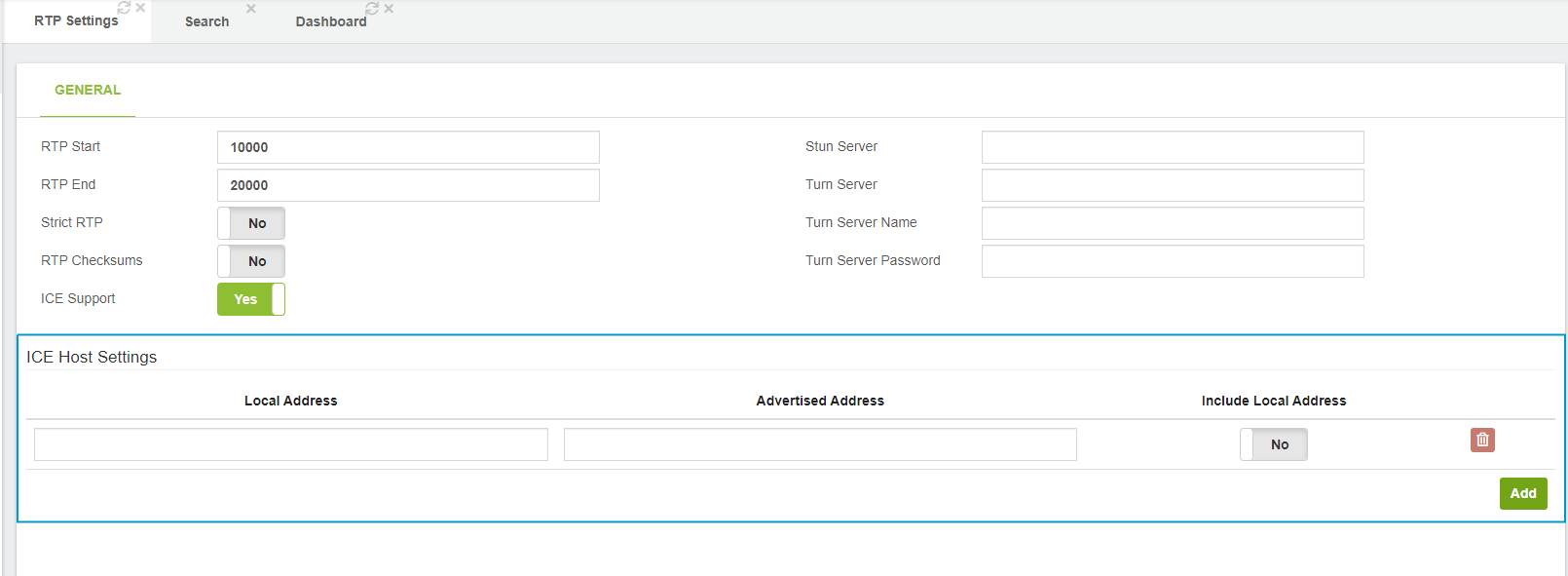
This option was added in VitalPBX v3.0.4
---
### Author:  [@intelesync](https://forums.vitalpbx.org/u/intelesync)
#### Post date: [July 28, 2021, 6:23pm UTC](https://forums.vitalpbx.org/t/no-call-audio-after-update-to-1-0-5-6/161/11 "2021-07-28T18:23:16Z")
Okay Maynor you found it! We’re running on a cloud service, so it’s technically a one2one NAT (I guess). That’s a debate for another day.
Remember, all was well in version 3.0.9-5, so obviously something was changed in this latest update to 3.1.0-1 that took into consideration the ICE settings. You can see my original ICE settings in the above screenshot.
So with defining these ICE Host Settings, per the title tip I removed the Stun Server setting. However, in VitXi WebRTC under Administration → Ice Servers, it will not allow me to delete both entries that were there.
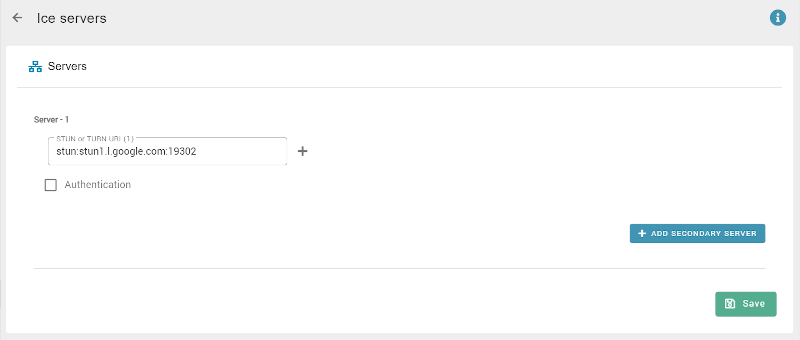
It forces at least an entry there. While everything is working right now, how should I proceed with this setting? Leave the STUN servers as is, or remove? Which your title tip says to remove.
---
### Author:  [@intelesync](https://forums.vitalpbx.org/u/intelesync)
#### Post date: [July 28, 2021, 6:37pm UTC](https://forums.vitalpbx.org/t/no-call-audio-after-update-to-1-0-5-6/161/12 "2021-07-28T18:37:44Z")
I appreciate your help PitzKey. It’s often impossible to pre-attach a resume to requests for help in public forums so that we can all skip beyond the “reboot your computer” kind of suggestions. I’ve been doing this for decades now, longer than most in this forum have been alive. I did come out of the gate with “Did an update… stopped working”. Updates require and do restarts. I think that was a good enough starting point for everyone.
I don’t want you to get discouraged by me from helping others, but please read between the lines and try to save the “reboot your computer” and “show us the logs” for those that do choose to not provide much detail when posting to forums. That was not the case here with no less than half a dozen paragraphs and screenshots provided.
---
### Author:  [@maynor](https://forums.vitalpbx.org/u/maynor)
#### Post date: [July 28, 2021, 6:52pm UTC](https://forums.vitalpbx.org/t/no-call-audio-after-update-to-1-0-5-6/161/13 "2021-07-28T18:52:27Z")
Perfect Sir!
In WebRTC iceServers are required, so in VitXi you cannot leave without any iceServer. What you can do is remove the value you have in the “ **Stun Server** ” field in the RTP settings.
---
### Author:  [@maynor](https://forums.vitalpbx.org/u/maynor)
#### Post date: [July 28, 2021, 7:01pm UTC](https://forums.vitalpbx.org/t/no-call-audio-after-update-to-1-0-5-6/161/14 "2021-07-28T19:01:29Z")
In VitXi WebRTC, you can leave the iceServers that come by default. But it is advisable to have your own because if these Google servers go down (normally these servers are stable), calls by VitXi WebRTC could not be made.
---
### Author:  [@intelesync](https://forums.vitalpbx.org/u/intelesync)
#### Post date: [July 28, 2021, 7:18pm UTC](https://forums.vitalpbx.org/t/no-call-audio-after-update-to-1-0-5-6/161/15 "2021-07-28T19:18:13Z")
Understood. Does VitalPBX offer these? ICE/STUN/TURN
---
### Author:  [@maynor](https://forums.vitalpbx.org/u/maynor)
#### Post date: [July 30, 2021, 3:26pm UTC](https://forums.vitalpbx.org/t/no-call-audio-after-update-to-1-0-5-6/161/16 "2021-07-30T15:26:18Z")
No, we do not offer. But there are useful tutorials online on how to create your own STUN/TURN server with coturn
---
### Author:  [@mohamed.soliman](https://forums.vitalpbx.org/u/mohamed.soliman)
#### Post date: [July 3, 2024, 12:12pm UTC](https://forums.vitalpbx.org/t/no-call-audio-after-update-to-1-0-5-6/161/17 "2024-07-03T12:12:56Z")
What if it is behind one-to-one NAT with dynamic ip , and to be updated by dynamic dns ?
---
### Author:  [@maynor](https://forums.vitalpbx.org/u/maynor)
#### Post date: [July 3, 2024, 3:35pm UTC](https://forums.vitalpbx.org/t/no-call-audio-after-update-to-1-0-5-6/161/18 "2024-07-03T15:35:06Z")
Hello,
Currently, we have not tested a scenario involving one-to-one NAT with a dynamic IP updated via Dynamic DNS. Based on Asterisk documentation, it may work by configuring the **External media address** and **External signal address** (you can find these settings under _Settings/Technology Settings/PJSIP Settings_) with your Dynamic DNS hostname.
Currently, the VitalPBX interface does not support enabling the “ **DNS Manager** ” module. Therefore, you should try creating the “_ **dnsmgr.conf** _” file in _ **/etc/asterisk/** _
Here’s a sample `dnsmgr.conf` configuration:
```auto
[general]
enable=yes ; Enable the DNS manager
refreshinterval=300 ; Time in seconds between DNS lookups
```
Afterward, restart Asterisk.
While we have not personally tested this specific setup, please make sure to back up before making any changes.
Best regards,
---
### Author:  [@mo10](https://forums.vitalpbx.org/u/mo10)
#### Post date: [July 3, 2024, 4:54pm UTC](https://forums.vitalpbx.org/t/no-call-audio-after-update-to-1-0-5-6/161/19 "2024-07-03T16:54:39Z")
Please report if maynors solution works!
Sounds very interesting.
---
### Author:  [@mohamed.soliman](https://forums.vitalpbx.org/u/mohamed.soliman)
#### Post date: [July 5, 2024, 6:18pm UTC](https://forums.vitalpbx.org/t/no-call-audio-after-update-to-1-0-5-6/161/20 "2024-07-05T18:18:30Z")
no luck not working ,