# Lets Encrypt Cert Type not working
**URL:** https://forums.vitalpbx.org/t/lets-encrypt-cert-type-not-working/4864
**Category:** VitalPBX
**Created:** [January 11, 2025, 12:57am UTC](https://forums.vitalpbx.org/t/lets-encrypt-cert-type-not-working/4864 "2025-01-11T00:57:21Z")
**Posts on this page:** 6
**Page:** 1
### Author:  [@C\_Taylor](https://forums.vitalpbx.org/u/C_Taylor)
#### Post date: [January 11, 2025, 12:57am UTC](https://forums.vitalpbx.org/t/lets-encrypt-cert-type-not-working/4864/1 "2025-01-11T00:57:21Z")
Having a problem that appears mildly similar to a couple of other posts here, but the solutions provided don’t work and the error message is probably different.
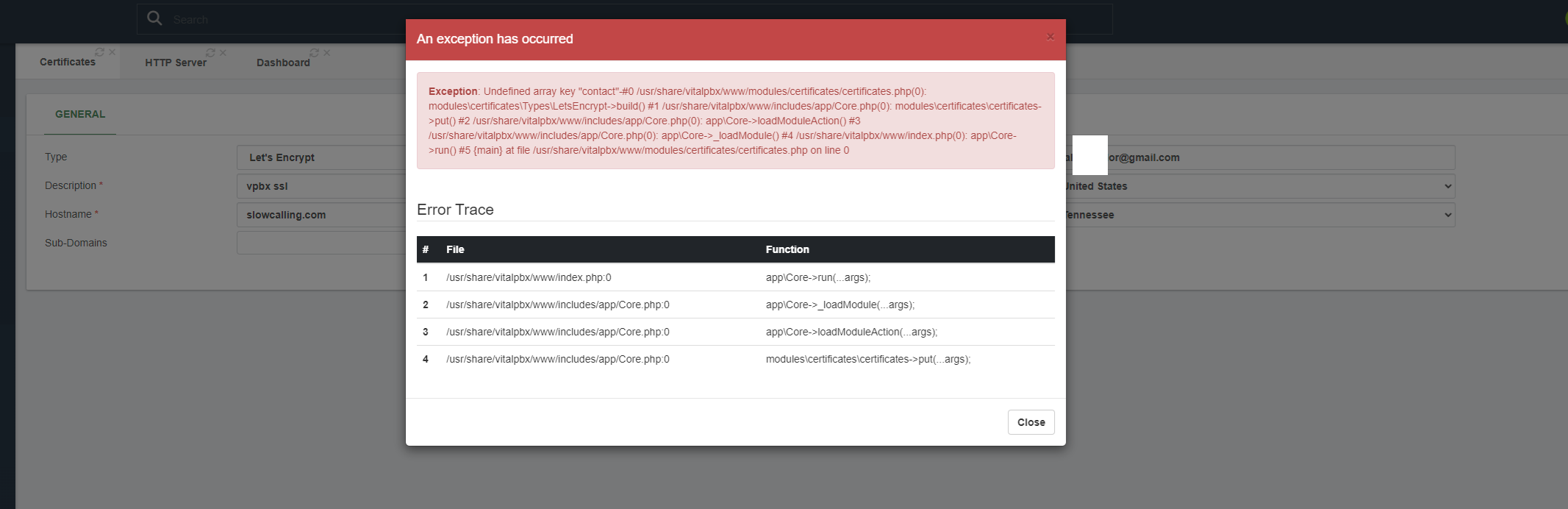
VitalPBX firewall is disabled, VPBX is running on a VPS.
---
### Author:  [@TELECOMIN](https://forums.vitalpbx.org/u/TELECOMIN)
#### Post date: [January 11, 2025, 12:23pm UTC](https://forums.vitalpbx.org/t/lets-encrypt-cert-type-not-working/4864/2 "2025-01-11T12:23:48Z")
Try …
> [@Error Certificate Letsencrypt VitalPBX 4.5.0-3](https://forums.vitalpbx.org/t/error-certificate-letsencrypt-vitalpbx-4-5-0-3/4863/3):
>
> Hello, Please make sure the FQDN is pointing to correct IP and try renewing the certificate. If the issue persists, please delete the domain folder inside /usr/share/vitalpbx/certificates and then try to create the certificate again. Regards, Hemant J.
---
### Author:  [@C\_Taylor](https://forums.vitalpbx.org/u/C_Taylor)
#### Post date: [January 11, 2025, 4:00pm UTC](https://forums.vitalpbx.org/t/lets-encrypt-cert-type-not-working/4864/3 "2025-01-11T16:00:12Z")
If the FQDN actually resolves to the web server, that should mean it’s pointing to the correct IP right? I am not aware of any DNS issue.
No luck generating the lets encrypt cert after deleting the domain folder; starting again with a fresh install on my VPS.
---
### Author:  [@C\_Taylor](https://forums.vitalpbx.org/u/C_Taylor)
#### Post date: [January 12, 2025, 5:47am UTC](https://forums.vitalpbx.org/t/lets-encrypt-cert-type-not-working/4864/4 "2025-01-12T05:47:31Z")
I used certbot on the VPS command line to generate a cert and added it as a custom cert, so now the vitalpbx http page has a valid SSL cert but the WebRTC server isn’t accessible anymore for some reason, not even by the IP. Is this a known issue or something to do with my config?
> **[How to install SSL on VPS | Hostinger Help Center](https://support.hostinger.com/en/articles/6360129-how-to-install-ssl-on-vps)**
>
> Exploring SSL certificate options for domains hosted on your Hostinger VPS
Update:
Currently viewing the “mini http server” on the HTTP bind address and port times out for port 8089 and port 8088 returns: ERR\_SSL\_PROTOCOL\_ERROR
Link to view the status page described here: [Configuring VitalPBX For WebRTC Clients](https://vitalpbx.com/blog/configuring-vitalpbx-for-webrtc-clients/)
looks like: vitalpbx-address:8089/httpstatus
What might be a probable reason for this?
–edit–
my workaround of using certbot to generate the SSL cert appears to work now, also I installed VPBX 4.5.0-3 on the VPS first, same problem generating the let’s encrypt cert.
---
### Author:  [@miguel](https://forums.vitalpbx.org/u/miguel)
#### Post date: [January 15, 2025, 6:15pm UTC](https://forums.vitalpbx.org/t/lets-encrypt-cert-type-not-working/4864/5 "2025-01-15T18:15:49Z")
This has been addressed in the latest update of VitalPBX 4.5
> [@loudspeaker VitalPBX v4.5.0 R4 Released – Discover What’s New!](https://forums.vitalpbx.org/t/vitalpbx-v4-5-0-r4-released-discover-what-s-new/4884):
>
> We are excited to announce the release of VitalPBX v4.5.0 R4, packed with new features, enhancements, and fixes to further improve your experience with our platform. This version also includes the latest Asterisk v20.11.1, ensuring optimal performance and compatibility. lady_beetle Bug Fixes Resolved compatibility issues with Let’s Encrypt API that prevented certificate renewal and creation. Fixed an issue where refreshing the PJSIP session during parked call retrieval caused calls to drop. C…
---
### Author:  [@system](https://forums.vitalpbx.org/u/system)
#### Post date: [February 14, 2025, 6:16pm UTC](https://forums.vitalpbx.org/t/lets-encrypt-cert-type-not-working/4864/6 "2025-02-14T18:16:10Z")
This topic was automatically closed 30 days after the last reply. New replies are no longer allowed.