# Incoming calls don't go through
**URL:** https://forums.vitalpbx.org/t/incoming-calls-dont-go-through/3014
**Category:** VitalPBX
**Created:** [August 4, 2023, 3:38am UTC](https://forums.vitalpbx.org/t/incoming-calls-dont-go-through/3014 "2023-08-04T03:38:56Z")
**Posts on this page:** 20
**Page:** 1
### Author:  [@elele](https://forums.vitalpbx.org/u/elele)
#### Post date: [August 4, 2023, 3:38am UTC](https://forums.vitalpbx.org/t/incoming-calls-dont-go-through/3014/1 "2023-08-04T03:38:56Z")
Hello,
I’m all new to this PBX thing so sorry in advanced!
I finally got everything to work, except incoming calls. Whenever I call in it says extension unavailable and I have to leave a voice mail.
My setup is only using softphones
---
### Author:  [@Dovid\_Gottheil](https://forums.vitalpbx.org/u/Dovid_Gottheil)
#### Post date: [August 4, 2023, 7:21pm UTC](https://forums.vitalpbx.org/t/incoming-calls-dont-go-through/3014/2 "2023-08-04T19:21:31Z")
If you go to Report and check PJSIP endpoints are they all green? If they are red it could be they are registered but not using the correct port e.g. using 5060 instead of 5061.
---
### Author:  [@elele](https://forums.vitalpbx.org/u/elele)
#### Post date: [August 4, 2023, 7:36pm UTC](https://forums.vitalpbx.org/t/incoming-calls-dont-go-through/3014/3 "2023-08-04T19:36:07Z")
It’s all showing green. Weird.
---
### Author:  [@elele](https://forums.vitalpbx.org/u/elele)
#### Post date: [August 4, 2023, 7:44pm UTC](https://forums.vitalpbx.org/t/incoming-calls-dont-go-through/3014/4 "2023-08-04T19:44:27Z")

Is this maybe the issue? Whenever I try to click the refresh button next to it, it keeps saying unregistered
---
### Author:  [@Dovid\_Gottheil](https://forums.vitalpbx.org/u/Dovid_Gottheil)
#### Post date: [August 4, 2023, 8:02pm UTC](https://forums.vitalpbx.org/t/incoming-calls-dont-go-through/3014/5 "2023-08-04T20:02:44Z")
Yeah I would make sure you are using the correct protocol and port
---
### Author:  [@maynor](https://forums.vitalpbx.org/u/maynor)
#### Post date: [August 4, 2023, 8:04pm UTC](https://forums.vitalpbx.org/t/incoming-calls-dont-go-through/3014/6 "2023-08-04T20:04:31Z")
Hello,
Could you please send screenshots of the webrtc profile and RTP settings?
Regards!
---
### Author:  [@elele](https://forums.vitalpbx.org/u/elele)
#### Post date: [August 4, 2023, 8:10pm UTC](https://forums.vitalpbx.org/t/incoming-calls-dont-go-through/3014/7 "2023-08-04T20:10:10Z")
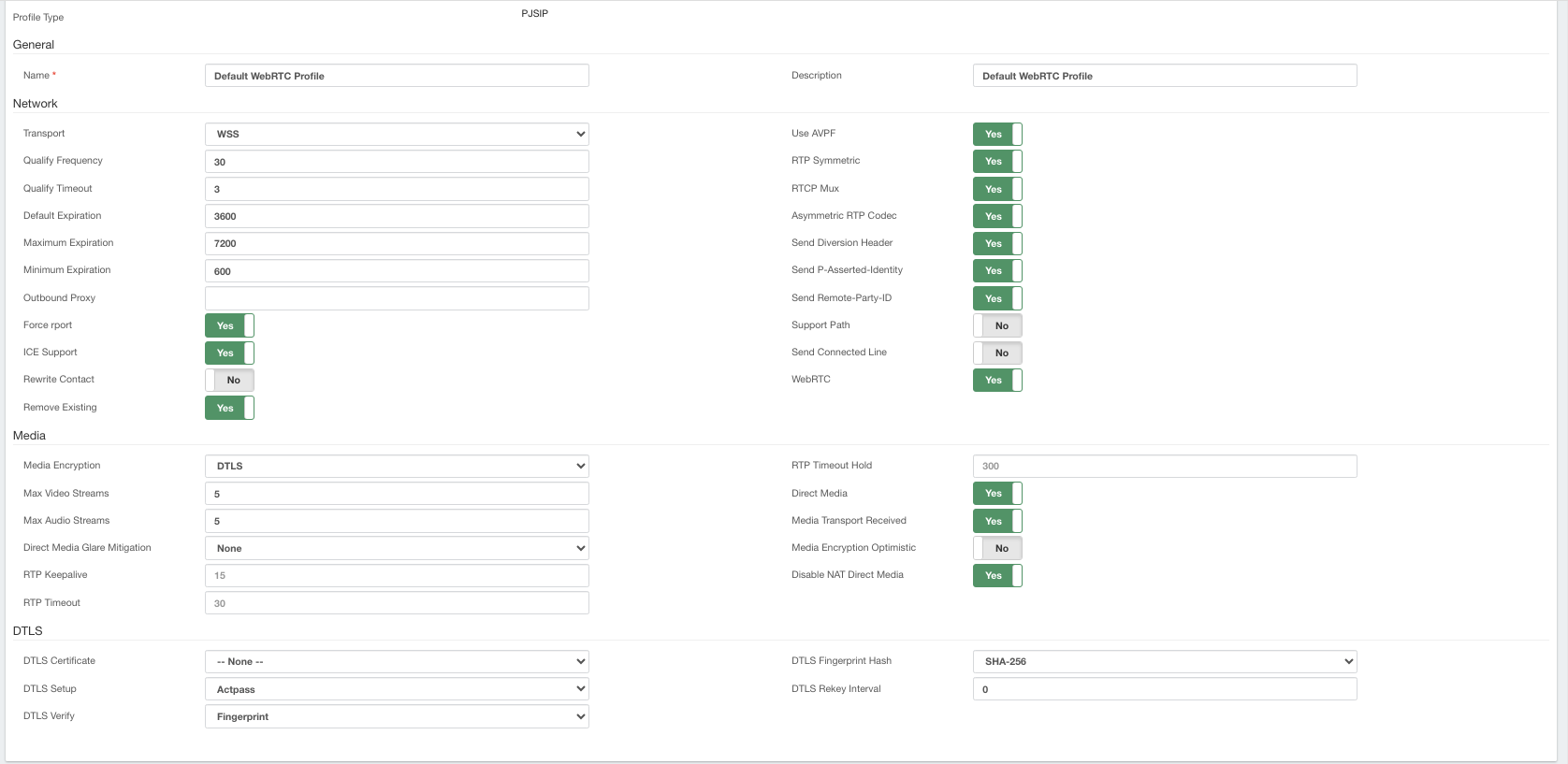
Hope these are the screenshots you need!
---
### Author:  [@elele](https://forums.vitalpbx.org/u/elele)
#### Post date: [August 4, 2023, 8:10pm UTC](https://forums.vitalpbx.org/t/incoming-calls-dont-go-through/3014/8 "2023-08-04T20:10:42Z")
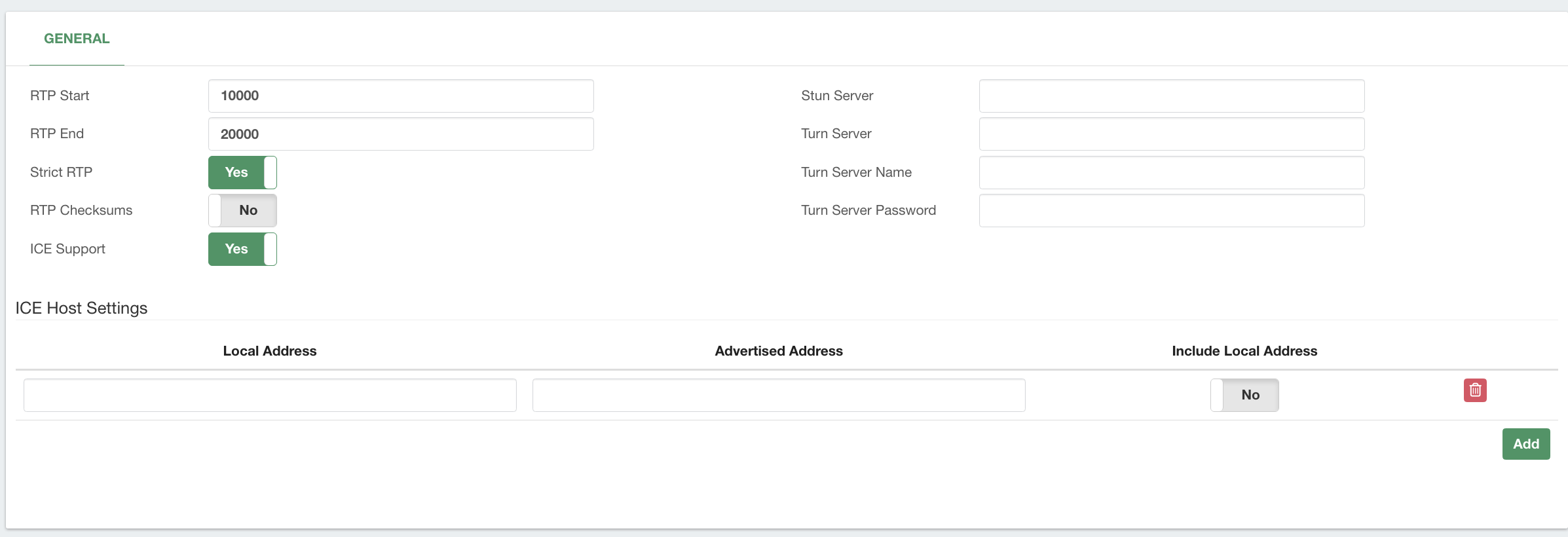
---
### Author:  [@maynor](https://forums.vitalpbx.org/u/maynor)
#### Post date: [August 4, 2023, 8:28pm UTC](https://forums.vitalpbx.org/t/incoming-calls-dont-go-through/3014/9 "2023-08-04T20:28:03Z")
Please attempt the following settings:
**WebRTC Profile:**
- Max Video Streams: 30
- Max Audio Streams: 30
- RTP Keepalive: 1
- RTP Timeout: 0
- DLS Certificate: _ **Select the SSL Certificate you have created** _.
- Disable Asymmetric RTP Codec.
- Disable Direct Media.
**RTP Settings:**
- Disable Strict RTP.
After saving and applying changes, please reload the VitXi App using CTRL + F5 (hard reload cache)
---
### Author:  [@elele](https://forums.vitalpbx.org/u/elele)
#### Post date: [August 4, 2023, 8:43pm UTC](https://forums.vitalpbx.org/t/incoming-calls-dont-go-through/3014/10 "2023-08-04T20:43:56Z")
It still says unregistered
---
### Author:  [@maynor](https://forums.vitalpbx.org/u/maynor)
#### Post date: [August 4, 2023, 8:47pm UTC](https://forums.vitalpbx.org/t/incoming-calls-dont-go-through/3014/11 "2023-08-04T20:47:10Z")
Please verify that port 6001 is enabled in VitalPBX and in any Firewall you have active.
Then, run the following commands:
**vitalpbx apply-firewall**
**/usr/share/vitxi/backend/artisan websockets:ssl-config**
**systemctl restart vitxi**
After that, please reload the application
---
### Author:  [@elele](https://forums.vitalpbx.org/u/elele)
#### Post date: [August 4, 2023, 9:01pm UTC](https://forums.vitalpbx.org/t/incoming-calls-dont-go-through/3014/12 "2023-08-04T21:01:30Z")
Ok finally got it to register with a different client. Using Zoiper, however, I’m still not able to get inbound calls it keeps saying user at extension is unavailable please leave a voice message
---
### Author:  [@maynor](https://forums.vitalpbx.org/u/maynor)
#### Post date: [August 4, 2023, 9:17pm UTC](https://forums.vitalpbx.org/t/incoming-calls-dont-go-through/3014/13 "2023-08-04T21:17:26Z")
Which profile is assigned to the extension you are trying to register?
---
### Author:  [@elele](https://forums.vitalpbx.org/u/elele)
#### Post date: [August 4, 2023, 9:18pm UTC](https://forums.vitalpbx.org/t/incoming-calls-dont-go-through/3014/14 "2023-08-04T21:18:01Z")
the WebRTC one or should I make a different profile?
---
### Author:  [@maynor](https://forums.vitalpbx.org/u/maynor)
#### Post date: [August 4, 2023, 9:20pm UTC](https://forums.vitalpbx.org/t/incoming-calls-dont-go-through/3014/15 "2023-08-04T21:20:37Z")
It depends on the use case. If the extension is intended to be used in VitXi or any other WebRTC application, it should have the WebRTC profile assigned. However, if the extension is meant to be used with a desktop phone or a softphone like Zoiper, then the PJSIP profile should be assigned to it.
---
### Author:  [@elele](https://forums.vitalpbx.org/u/elele)
#### Post date: [August 4, 2023, 9:32pm UTC](https://forums.vitalpbx.org/t/incoming-calls-dont-go-through/3014/16 "2023-08-04T21:32:01Z")
Even when I use the PJSIP profile for the Zoiper, it still keeps saying the extension is unavailable
---
### Author:  [@PitzKey](https://forums.vitalpbx.org/u/PitzKey)
#### Post date: [August 6, 2023, 1:22am UTC](https://forums.vitalpbx.org/t/incoming-calls-dont-go-through/3014/17 "2023-08-06T01:22:23Z")
Can you please explain your network setup?
---
### Author:  [@NerdUno](https://forums.vitalpbx.org/u/NerdUno)
#### Post date: [August 9, 2023, 4:39pm UTC](https://forums.vitalpbx.org/t/incoming-calls-dont-go-through/3014/18 "2023-08-09T16:39:43Z")
We have seen the exact same thing using Zoiper 5. VitalPBX always detects the extension as busy. The iOS Telephone app works just fine with the same extension and settings. May I suggest the VitalPBX team download the free Zoiper 5 client and see if you can identify the problem.
---
### Author:  [@miguel](https://forums.vitalpbx.org/u/miguel)
#### Post date: [August 9, 2023, 10:04pm UTC](https://forums.vitalpbx.org/t/incoming-calls-dont-go-through/3014/19 "2023-08-09T22:04:54Z")
What version of VitalPBX are you using and what protocol (IAX2 or PJSIP)?
---
### Author:  [@admin](https://forums.vitalpbx.org/u/admin)
#### Post date: [August 9, 2023, 10:24pm UTC](https://forums.vitalpbx.org/t/incoming-calls-dont-go-through/3014/20 "2023-08-09T22:24:24Z")
Just as a reminder.
In VitalPBx when you create a normal device (No webRTC ) the profile to use is “Default PJSIP Profile”
I say this because the behavior they describe is the same as when you want to register a Softphone in an account with the “Default webRTC Profile” profile.
[Next page](https://forums.vitalpbx.org/t/incoming-calls-dont-go-through/3014.md?page=2)